9 Best Keychron Mechanical Keyboards Under $100, Compared
As an Amazon Associate we earn from qualifying purchases. Links on this page are affiliate links.
Finding the best keychron mechanical keyboards under $100 requires looking at specific technical details. We compared 9 models based on the specifications published on their listings. The Keychron V6 Max Full-Size Wireless Keyboard leads because it offers hot-swap support in a complete layout. This feature lets you change switches without soldering. You can choose between full-size, compact, or low-profile designs depending on your needs. This guide helps you decide which form factor and connectivity options suit your desk setup.
Quick picks
The best fit for you
- You need a full-size layout with a number pad Keychron V6 Max Full-Size Wireless Keyboard It features a 108-key layout and hot-swappable Brown switches.
- You want a compact board with a numeric row Keychron V5 Max 96% Wireless Keyboard It offers a 96% form factor with Red switches.
- You prefer a small footprint for portable use Keychron K6 Pro Wireless Mechanical Keyboard It is a 65% layout with hot-swappable Red switches.
- You require quiet typing in shared spaces Keychron K8 Wireless TKL Silent Keyboard It uses Silent Red switches and white backlighting.
Our 9 picks

Keychron V6 Max Full-Size Wireless Keyboard
Best for: Users needing a full-size layout with hot-swap support
- Switch Type
- Tactile Brown (Gateron Jupiter)
- Form Factor
- Full-size 100% (108 Keys)
- Connectivity
- 2.4 GHz, Bluetooth 5.1, wired
- Hot-Swap Support
- Yes (3-pin and 5-pin MX)
- Backlighting
- South-facing RGB
- Keycap Material
- Double-shot PBT
The Keychron V6 Max is a full-size 100% layout mechanical keyboard with 108 keys. It features 2.4 GHz and Bluetooth 5.1 connectivity with a 1000 Hz polling rate. The board uses a gasket design with sound-absorbing foam and double-shot PBT keycaps. It supports hot-swappable switches and QMK remapping via a web app. This model suits users who need a complete number pad and dedicated function keys for their workflow.
Pros
- Full-size 100% layout with 108 keys
- Hot-swappable 3-pin and 5-pin MX switches
- Double-shot PBT keycaps with OSA profile
- South-facing RGB backlighting
- 1000 Hz polling rate on 2.4 GHz
Cons
- Large footprint requires significant desk space
- No dedicated media keys for volume or playback
- South-facing RGB may not work with all switch types
Good fit if
- You need a full number pad and arrow keys
- You want to swap switches without soldering
- You prefer tactile brown switches for typing
Skip if
- You have limited desk space for a full-size board
- You prefer a compact layout without a number pad
- You need a keyboard with dedicated media controls
Verdict: Keychron V6 Max Full-Size Wireless Keyboard is a practical option for users who require a complete 108-key layout and hot-swappable switch support. It fits those who value a full number pad and tactile typing experience over compact portability.

Keychron V5 Max 96% Wireless Keyboard
Best for: Users needing a number pad in a compact layout
- Switch Type
- Gateron Jupiter Red
- Form Factor
- 96%
- Connectivity
- Bluetooth 5.1, 2.4 GHz, wired
- Keycap Material
- Double-shot PBT
The Keychron V5 Max is a 96% custom mechanical keyboard featuring Gateron Jupiter Red switches. It supports 2.4 GHz and Bluetooth 5.1 connectivity with a 1000 Hz polling rate. The design includes a gasket mount, hot-swappable sockets, and double-shot PBT keycaps. You can remap keys via the QMK Launcher web app. This layout includes a number pad, making it suitable for users who need compact dimensions without sacrificing numeric input.
Pros
- 96% layout with integrated number pad
- Dual 2.4 GHz and Bluetooth 5.1 connectivity
- Hot-swappable sockets for easy switch replacement
- Double-shot PBT keycaps for durability
- QMK Launcher web app for custom remapping
Cons
- 96% layout is larger than standard tenkeyless designs
- Requires wired connection for QMK programming
- Gateron Jupiter Red switches are linear and lack tactile feedback
Good fit if
- You need a number pad but want a compact footprint
- You prefer linear switches for fast typing
- You want to customize keymaps without dedicated software
Skip if
- You require a tenkeyless layout without a number pad
- You prefer tactile or clicky switches for feedback
- You need wireless programming capabilities
Verdict: Keychron V5 Max 96% Wireless Keyboard offers a balanced mix of compact size and numeric utility. It fits users who want a full numeric row in a smaller frame and enjoy customizing their typing experience.

Keychron K6 Pro Wireless Mechanical Keyboard
Best for: Compact hot-swap enthusiasts
- Switch Type
- Keychron K Pro Red
- Form Factor
- 65%
- Connectivity
- Bluetooth 5.1, wired
- Backlighting
- RGB
- Hot-Swap Support
- Hot-Swappable
- Use
- Office
View on Amazon: Keychron K6 Pro Wireless Mechanical Keyboard
The Keychron K6 Pro is a 65% layout mechanical keyboard featuring Bluetooth 5.1 and wired connectivity. It includes hot-swappable sockets for MX-style switches and pre-installed Keychron K Pro Red switches. QMK/Launcher support allows key remapping via a web app. The design incorporates sound-absorbing foam and steel plates for a stable typing experience. This compact option suits users seeking a customizable, portable keyboard for Mac or Windows systems.
Pros
- 65% compact form factor saves desk space
- Hot-swappable PCB supports 3-pin and 5-pin MX switches
- QMK/Launcher web app enables custom key remapping
- Bluetooth 5.1 connects to up to three devices
- Integrated sound-absorbing foam and steel plate reduce noise
Cons
- Wired mode required for key remapping
- Only two height options available
- Lacks 2.4 GHz wireless connectivity
Good fit if
- You need a compact keyboard for a small desk
- You want to customize switches without soldering
- You use multiple devices and need Bluetooth switching
Skip if
- You require full-size layouts with numpads
- You prefer low-latency 2.4 GHz wireless connections
- You need to remap keys while wireless
Verdict: Keychron K6 Pro 65% Wireless Keyboard offers a solid mix of customization and portability for users who value hot-swap flexibility and compact design over high-speed wireless performance.

Keychron V1 Max 75% Wireless Keyboard
Best for: Compact setups needing wireless flexibility
- Switch Type
- Gateron Jupiter Red
- Form Factor
- 75%
- Connectivity
- 2.4 GHz, Bluetooth 5.1, wired
- Backlighting
- South-facing RGB
- Keycap Material
- Double-shot PBT
- Media Controls
- Volume Knob
The Keychron V1 Max is a compact 75% mechanical keyboard featuring a gasket mount and hot-swappable switches. It supports dual wireless modes, including 2.4 GHz with a 1000 Hz polling rate and Bluetooth 5.1 for up to three devices. The build includes double-shot PBT keycaps and a physical volume knob. It is designed for users who want a customizable layout with QMK support and cross-platform compatibility.
Pros
- Compact 75% layout saves desk space
- Dual connectivity with 2.4 GHz and Bluetooth 5.1
- Physical volume knob for media control
- Hot-swappable switches and QMK customization
Cons
- Smaller 75% layout lacks dedicated number pad
- No included software for deep customization
- Only two switch options available
Good fit if
- You need a compact keyboard with a number row
- You want wireless freedom with low latency
- You prefer tactile feedback from a volume knob
Skip if
- You require a full-size layout with numpad
- You need wired-only connectivity
- You prefer linear switches over tactile ones
Verdict: Keychron V1 Max 75% Wireless Keyboard offers a balanced mix of portability and performance for users who value wireless flexibility and physical controls. It suits those who want a compact setup without sacrificing customization options.

Keychron K10 Max Full-Size Mechanical Keyboard
Best for: Users needing a full-size hot-swap wireless keyboard
- Switch Type
- Tactile brown
- Form Factor
- Full-size
- Connectivity
- 2.4 GHz, Bluetooth 5.1, wired
- Backlighting
- RGB
- Keycap Material
- Double-shot PBT
- Hot-Swap Support
- Hot-Swappable
View on Amazon: Keychron K10 Max Full-Size Mechanical Keyboard
The Keychron K10 Max is a full-size mechanical keyboard with 108 keys. It connects via 2.4 GHz, Bluetooth 5.1, or wired USB. The board features hot-swappable brown tactile switches and double-shot PBT keycaps. You get south-facing RGB lighting and QMK programmability through a web app. This layout suits users who need a number pad and extensive connectivity options.
Pros
- Full-size 108-key layout with dedicated number pad
- Hot-swappable sockets for 3-pin and 5-pin MX switches
- Triple connectivity including 1000 Hz 2.4 GHz wireless
- Double-shot PBT keycaps with OSA profile
- QMK firmware and web app for key remapping
Cons
- Full-size footprint requires significant desk space
- Heavier build due to steel plate and foam layers
- No dedicated macro keys beyond standard layout
Good fit if
- You need a full-size keyboard with a number pad
- You want to swap switches without soldering
- You use multiple devices via Bluetooth and 2.4 GHz
Skip if
- You prefer a compact 75% or lower layout
- You need a keyboard with dedicated media controls
- You want a lightweight portable design
Verdict: Keychron K10 Max Full-Size Wireless is a robust option for users who require a full-size layout with hot-swap capabilities and versatile wireless connectivity.

Keychron K8 Wireless TKL Silent Keyboard
Best for: quiet office environments
- Switch Type
- Keychron Silent K Pro Red
- Form Factor
- TKL
- Connectivity
- Bluetooth 5.1, USB-C wired
- Backlighting
- White LED
- Use
- Gaming
- Operating System
- Mac, Windows
The Keychron K8 is a TKL mechanical keyboard featuring Silent Red switches and white LED backlighting. It connects via Bluetooth 5.1 to three devices or uses USB-C wired mode with a 1000 Hz polling rate. The switches are factory pre-lubed for a quiet typing experience. It supports both macOS and Windows. This model suits users who need a compact layout and low noise levels for shared spaces.
Pros
- Silent Red switches reduce typing noise
- White LED backlighting for visibility
- Bluetooth 5.1 connects to three devices
- 1000 Hz wired polling rate for gaming
Cons
- Only white backlighting available
- No QMK or VIA programmability listed
- TKL layout lacks numpad
Good fit if
- You work in a quiet office
- You need a compact TKL layout
- You use macOS or Windows
Skip if
- You require a numpad
- You need customizable backlight colors
- You want full QMK/VIA support
Verdict: Keychron K8 TKL Silent Red is a quiet, compact option for shared spaces. It fits users who prioritize low noise and a smaller footprint over advanced customization.

Keychron J9 Ultra Low-Profile Wireless Keyboard
Best for: low-latency gaming and compact setups
- Switch Type
- Keychron low-profile Red
- Form Factor
- Compact
- Connectivity
- 2.4 GHz, Bluetooth 5.2, wired
- Backlighting
- RGB
- Hot-Swap Support
- Hot-Swappable
- Dimensions
- 12.4 × 5.23 × 1.01 inches
View on Amazon: Keychron J9 Ultra Low-Profile Wireless Keyboard
The Keychron J9 Ultra is a compact, low-profile mechanical keyboard featuring an 8,000 Hz polling rate for ultra-low latency in wired and 2.4 GHz modes. It supports Bluetooth 5.2 for connecting up to three devices and includes hot-swappable switches. The design incorporates IXPE and EPDM acoustic foams for a quieter typing experience. With ZMK programmability and a 480-hour battery life, it suits users seeking speed and customization in a slim form factor.
Pros
- 8,000 Hz polling rate for minimal input lag
- Hot-swappable low-profile mechanical switches
- ZMK firmware and Launcher app for deep customization
- Up to 480 hours of battery life with backlight off
Cons
- Compact layout lacks a dedicated numpad
- Requires a modern browser for the Launcher app
- Low-profile switches may feel different to standard users
Good fit if
- You need high-speed response for competitive gaming
- You want to customize macros and lighting via software
- You prefer a slim, low-profile typing feel
Skip if
- You require a full-size keyboard with a numpad
- You prefer standard-height mechanical switches
- You need a keyboard without software configuration
Verdict: The Keychron J9 Ultra 8K Low-Profile Keyboard delivers professional-grade responsiveness with its 8,000 Hz polling rate. It is the right choice for gamers and typists who prioritize speed and compact design over traditional switch heights.
Keychron K3 Max SE Low-Profile Wireless Keyboard
Best for: Compact low-profile setups with QMK needs
- Switch Type
- Keychron Milk POM Red
- Form Factor
- 75%
- Connectivity
- 2.4 GHz, Bluetooth 5.2, wired
- Keycap Material
- Double-shot PBT
- Dimensions
- 12.5 × 4.96 × 0.78 inches
View on Amazon: Keychron K3 Max SE Low-Profile Wireless Keyboard
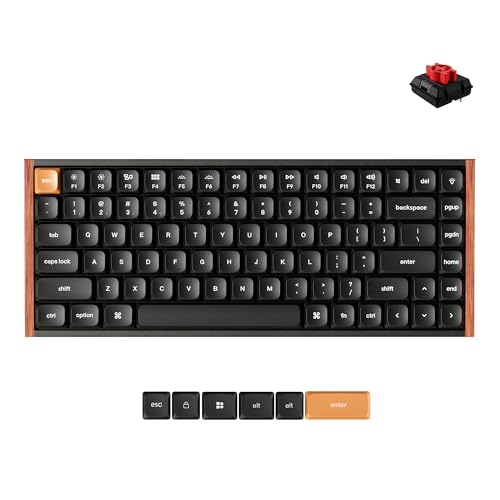
The Keychron K3 Max SE is an ultra-slim 75% mechanical keyboard featuring a low-profile design. It supports 2.4 GHz, Bluetooth 5.2, and wired connections with a 1000 Hz polling rate for responsive input. The board uses QMK firmware for deep customization via the Launcher web app. It includes hot-swappable Keychron Milk POM Red switches and double-shot PBT keycaps. This compact layout suits users who want a smaller footprint without sacrificing connectivity or typing customization.
Pros
- Ultra-slim 75% low-profile form factor
- Triple connectivity: 2.4 GHz, Bluetooth 5.2, and wired
- 1000 Hz polling rate for fast response
- QMK firmware with Launcher web app support
- Hot-swappable switches and double-shot PBT keycaps
Cons
- Only 75% layout lacks dedicated arrow keys and numpad
- No dedicated display or volume knob for media control
- Requires Chrome, Opera, or Edge browser for Launcher app
Good fit if
- You need a compact keyboard that fits on small desks
- You want low-profile switches with a slim profile
- You prefer wireless connectivity with 2.4 GHz speed
Skip if
- You require a full-size keyboard with a number pad
- You need a high-profile mechanical switch experience
- You prefer a keyboard with dedicated hardware media controls
Verdict: Keychron K3 Max SE 75% Slim QMK is a compact, low-profile option for users who prioritize a small footprint and wireless flexibility. It fits those who want QMK customization without the bulk of a full-size board.

Keychron Full-Size Wireless Magnetic Keyboard
Best for: full-size layouts with a number pad
- Switch Type
- magnetic
- Form Factor
- full-size
- Connectivity
- 2.4 GHz wireless, Bluetooth, USB-C
- Backlighting
- RGB
- Keycap Material
- PBT
- Color
- Black
View on Amazon: Keychron Full-Size Wireless Magnetic Keyboard
The Keychron J15 HE is a full-size magnetic keyboard with a dedicated number pad. It supports tri-mode connectivity via 2.4 GHz wireless, Bluetooth, and USB-C. The 4000mAh battery supports extended use. Adjustable actuation from 0.2 mm to 3.3 mm suits typing or gaming. QMK customization allows per-key remapping. The black PBT keycaps offer durability. This model fits users needing a large layout for spreadsheets or data entry.
Pros
- Full-size layout with dedicated number pad
- Adjustable actuation depth from 0.2 mm to 3.3 mm
- Tri-mode connectivity including 2.4 GHz wireless and Bluetooth
- 4000mAh rechargeable battery for long wireless use
- Hot-swappable magnetic switches and PBT keycaps
Cons
- Large footprint requires significant desk space
- Compatible only with magnetic switches sold on the Keychron website
- Heavy at 2.86 pounds
Good fit if
- You need a full-size layout with a number pad for data entry
- You want adjustable actuation points for gaming or typing
- You prefer wireless flexibility with 2.4 GHz and Bluetooth
Skip if
- You need a compact or portable keyboard
- You want to use third-party non-magnetic switches
- You prefer a lighter keyboard for travel
Verdict: The Keychron J15 HE Full-Size Magnetic serves users who require a large layout with a number pad for work and gaming. Its adjustable actuation and tri-mode connectivity make it a solid choice for stationary desks.
Specifications side by side
| Spec | Keychron V6 Max Full-Size Wireless Keyboard | Keychron V5 Max 96% Wireless Keyboard | Keychron K6 Pro Wireless Mechanical Keyboard | Keychron V1 Max 75% Wireless Keyboard | Keychron K10 Max Full-Size Mechanical Keyboard | Keychron K8 Wireless TKL Silent Keyboard | Keychron J9 Ultra Low-Profile Wireless Keyboard | Keychron K3 Max SE Low-Profile Wireless Keyboard | Keychron Full-Size Wireless Magnetic Keyboard |
|---|---|---|---|---|---|---|---|---|---|
| Switch Type | Tactile Brown (Gateron Jupiter) | Gateron Jupiter Red | Keychron K Pro Red | Gateron Jupiter Red | Tactile brown | Keychron Silent K Pro Red | Keychron low-profile Red | Keychron Milk POM Red | magnetic |
| Form Factor | Full-size 100% (108 Keys) | 96% | 65% | 75% | Full-size | TKL | Compact | 75% | full-size |
| Connectivity | 2.4 GHz, Bluetooth 5.1, wired | Bluetooth 5.1, 2.4 GHz, wired | Bluetooth 5.1, wired | 2.4 GHz, Bluetooth 5.1, wired | 2.4 GHz, Bluetooth 5.1, wired | Bluetooth 5.1, USB-C wired | 2.4 GHz, Bluetooth 5.2, wired | 2.4 GHz, Bluetooth 5.2, wired | 2.4 GHz wireless, Bluetooth, USB-C |
| Hot-Swap Support | Yes (3-pin and 5-pin MX) | not specified | not specified | not specified | not specified | not specified | not specified | not specified | not specified |
| Backlighting | South-facing RGB | not specified | RGB | South-facing RGB | RGB | White LED | RGB | not specified | RGB |
| Keycap Material | Double-shot PBT | Double-shot PBT | not specified | Double-shot PBT | Double-shot PBT | not specified | not specified | Double-shot PBT | PBT |
| Media Controls | not specified | not specified | not specified | Volume Knob | not specified | not specified | not specified | not specified | not specified |
| Use | not specified | not specified | Office | not specified | not specified | Gaming | not specified | not specified | not specified |
| Color | Hot-swap Gateron Jupiter Brown Switch | Gateron Jupiter Red Switch | Hot-swappable Keychron K Pro Red Switch | Gateron Jupiter Red Switch | Hot-swap Apex Brown Switch | Silent Red Switch | Hot-swappable Red Switch | Red Switch | Black |
| Operating System | not specified | not specified | Mac, Windows | not specified | not specified | Mac, Windows | not specified | not specified | not specified |
| Noise Level | not specified | not specified | not specified | not specified | not specified | Silent | not specified | not specified | not specified |
| Dimensions | 17.6 × 5.87 × 1.28 inches | not specified | 12.3 × 4.09 × 1.57 inches | not specified | 17.6 × 5.5 × 1.57 inches | 14.1 × 4.84 × 1.65 inches | 12.4 × 5.23 × 1.01 inches | 12.5 × 4.96 × 0.78 inches | 18 × 5.84 × 1.62 inches |
| Weight | not specified | not specified | not specified | not specified | not specified | 2.2 pounds | 1.34 pounds | not specified | 2.86 pounds |
| Size | Compact | not specified | not specified | not specified | not specified | White Backlight | not specified | not specified | not specified |
| Model | V6 Max | not specified | K6P-H1 | V1 Max | Keychron K10 Max | not specified | not specified | K3M-F1 | not specified |
If you also manage system thermals, compare component specifications across the best heatsinks under 100 for your desktop build.
How to Choose Your Keyboard
-
Check Connectivity Type
You must verify the connection method before buying. Some models like the Keychron V6 Max use Bluetooth, which is ideal for clean desks without extra cables. Others offer tri-mode wireless support, allowing you to switch between devices easily. If you need the lowest possible latency for competitive gaming, look for models that support high polling rates. The Keychron J9 Ultra provides an 8,000 Hz polling rate for instant response. Ensure your chosen connection matches your workflow and device compatibility needs.
-
Select the Right Form Factor
The physical size determines how much desk space you need. Full-size boards like the Keychron K10 Max include a number pad for data entry. If you prefer more mouse space, a 75% layout like the Keychron V1 Max keeps essential keys while removing the numpad. Compact 65% options, such as the Keychron K6 Pro, are highly portable. Measure your desk area first. Choosing the correct form factor ensures you do not outgrow your setup or struggle with a board that is too large for your workspace.
-
Verify Hot-Swap Support
Hot-swappable sockets allow you to change switches without soldering. This feature is present in many models, including the Keychron V6 Max and K6 Pro. It lets you experiment with different tactile feels later. If you buy a board without this support, you are stuck with the original switches. Check the specifications to confirm hot-swap capability. This flexibility is crucial for users who want to customize their typing experience over time without buying a new keyboard entirely.
-
Choose Your Switch Type
Switches define the tactile feedback and sound. Linear switches, like the Red switches found in the Keychron V5 Max, offer smooth keystrokes with no bump. Tactile switches, such as the Brown switches in the Keychron V6 Max, provide a noticeable bump for feedback. Silent switches, like those in the Keychron K8, reduce noise for shared offices. Match the switch type to your preference for sound and feel. This decision significantly impacts your daily typing comfort and accuracy.
-
Review Backlighting Options
Backlighting helps you type in low light. Some keyboards feature RGB lighting for customization, while others offer simple white backlighting. The Keychron K8 uses white backlighting, which is sufficient for visibility without distraction. RGB options allow you to change colors to match your setup. Check the product specs to see if lighting is included. If you work in a quiet office, a subtle white light may be preferable. Ensure the lighting type suits your environment and personal style.
-
Check Media Controls
Physical media controls add convenience for volume adjustment. The Keychron V1 Max includes a dedicated volume knob for quick changes. This feature saves you from using keyboard shortcuts or going into software settings. If you frequently adjust audio levels, look for models with physical dials. Verify the presence of these controls in the attributes list. Having direct access to volume can streamline your workflow, especially during calls or media playback sessions.
Frequently asked questions
Which Keychron keyboard is best for gaming with low latency?
The Keychron J9 Ultra Low-Profile Wireless Keyboard is the top choice for gamers. It features an 8,000 Hz polling rate for professional-grade responsiveness. This high frequency reduces input lag significantly. It also includes hot-swappable Red switches for quick customization. The compact 85% layout saves desk space while maintaining performance.
Does the Keychron V6 Max support hot-swappable switches?
Yes, the Keychron V6 Max Full-Size Wireless Keyboard supports hot-swappable switches. This allows you to change the tactile feel without soldering. It comes equipped with Gateron Jupiter Brown switches by default. This feature is ideal for users who want to customize their typing experience easily. The full-size layout also includes a complete number pad.
Is there a Keychron keyboard with a volume knob?
The Keychron V1 Max 75% Wireless Keyboard includes a physical volume knob. This provides direct control over audio levels without using software. It features a compact 75% form factor with Red switches. The wireless connectivity offers flexibility for various desk setups. This model balances portability with convenient hardware controls for media management.
Which model is the quietest for office use?
The Keychron K8 Wireless TKL Silent Keyboard is designed for quiet environments. It uses Silent Red switches to minimize noise during typing. The white backlighting offers clear visibility without distraction. Its tenkeyless layout reduces desk footprint compared to full-size boards. This makes it suitable for shared workspaces where low noise is a priority.
Can I customize the Keychron K3 Max SE with QMK?
Yes, the Keychron K3 Max SE Low-Profile Wireless Keyboard supports QMK customization. This allows for deep firmware-level configuration of keys and macros. It features a slim 75% profile with Red switches. The compact design saves space while offering wireless flexibility. This model is ideal for users who want extensive customization without a large board.
What is the difference between the V6 Max and K10 Max?
Both keyboards offer full-size layouts and hot-swappable Brown switches. The Keychron V6 Max is noted for its practical full-size design with Bluetooth connectivity. The Keychron K10 Max is described as a robust option with versatile wireless connectivity. Both include a complete number pad. The V6 Max is positioned as the best overall pick, while the K10 Max serves as a premium alternative.
Does the Keychron J15 HE support tri-mode connectivity?
Yes, the Keychron Full-Size Wireless Magnetic Keyboard supports tri-mode connectivity. This allows you to connect via multiple wireless methods. It features a full-size layout with a number pad. The magnetic switches offer adjustable actuation for both work and gaming. This model is designed for stationary desks where versatility and large layout are important.