7 Best Redragon Mechanical Keyboards with Red Switch, Compared
As an Amazon Associate we earn from qualifying purchases. Links on this page are affiliate links.
We compared 7 best redragon mechanical keyboards with red switch to help you choose. Our top pick is the Redragon Wired Mechanical Keyboard with Red Switches because it features a sturdy aluminum frame for durability. These selections are based strictly on the specifications published on the listings. Red switches offer smooth linear action, which suits many gaming and typing styles. This guide helps you decide which layout and connectivity option fits your desk space and workflow needs.
Quick picks
The best fit for you
- You need a sturdy aluminum frame for desktop gaming Redragon Wired Mechanical Keyboard with Red Switches It features a durable aluminum chassis with full anti-ghosting for reliable wired performance.
- You want wireless freedom with a number pad Redragon Wireless Full-Size Red Switch Keyboard This full-size model offers tri-mode connectivity and dedicated macro keys for versatility.
- You prefer a compact layout with dedicated arrow keys Redragon 60% Hot-Swap Mechanical Keyboard The 68-key frame provides hot-swappable switches while retaining standard directional navigation keys.
- You want maximum desk space for mouse movement Redragon 60% Compact Wired Mechanical Keyboard The 61-key footprint is minimal, freeing up room for competitive gaming setups.
- You only need a keypad for one hand Redragon One-Handed Hot-Swappable Mechanical Keypad This 42-key device offers hot-swap sockets and onboard macros for focused control.
Our 7 picks

Redragon Wired Mechanical Keyboard with Red Switches
Best for: desktop gaming with durable aluminum construction
- Switch Type
- Red Switch (what this guide is about)
- Connectivity
- Wired
- Backlighting
- RGB
- Case Material
- Aluminum alloy
- Use
- Gaming
- Operating System
- Mac, Windows
View on Amazon: Redragon Wired Mechanical Keyboard with Red Switches
This Redragon keyboard pairs smooth red switches with a rigid aluminum alloy top panel and full-key anti-ghosting. At 17.1 inches long and 2.77 pounds, it gives you a stable desk footprint for typing and gaming. It connects via a standard wired cable and features customizable RGB backlighting with 20 preset modes. If you want a durable full-length deck with light, linear key action and programmable macros, this board covers your daily essentials.
Pros
- Aluminum alloy top panel provides structural rigidity at 2.77 pounds
- Linear red switches with four spare switches included in the box
- Full-key anti-ghosting across the entire layout
- Customizable RGB backlighting with 20 preset modes
- Twelve multimedia shortcut functions
Cons
- Wired-only connection with no wireless capability
- Full 17.1-inch length takes up substantial desktop space
Good fit if
- You want linear red switches mounted to a rigid metal panel.
- You need full anti-ghosting and programmable macro shortcuts.
- You prefer a permanently wired setup compatible with Windows and Mac.
Skip if
- You need a wireless keyboard for travel or cable-free use.
- You have limited desk space and need a compact 60% or tenkeyless layout.
Verdict: Redragon Aluminum Wired Red Switch Keyboard delivers a sturdy aluminum frame, smooth linear red switches, and full-key anti-ghosting in a dependable wired package. It provides the core macro and lighting customizability you need for stationary desktop setups.

Redragon Wireless Full-Size Red Switch Keyboard
Best for: full-size wireless gaming and macro customization
- Switch Type
- Red Switch (what this guide is about)
- Connectivity
- USB-C, Bluetooth, 2.4GHz wireless
- Backlighting
- RGB
- Use
- Gaming
- Game Genre
- MMO
- Dimensions
- 15.8 × 5.91 × 0.98 inches
View on Amazon: Redragon Wireless Full-Size Red Switch Keyboard
This full-size gaming keyboard features linear Red switches, 104-key anti-ghosting, and tri-mode connectivity across 2.4GHz wireless, Bluetooth, and USB-C. You get five dedicated macro keys alongside a dedicated media wheel for rapid adjustments. It also includes hot-swappable sockets compatible with 3-pin and 5-pin switches. If you need a full layout with versatile wireless options and hardware controls for gaming or daily productivity, this board covers your setup.
Pros
- Tri-mode connectivity via 2.4GHz wireless, Bluetooth, and USB-C
- Hot-swappable sockets support 3-pin and 5-pin switches
- Five dedicated onboard macro keys and physical media wheel
- Full 104-key anti-ghosting for simultaneous inputs
Cons
- Full 15.8-inch width requires substantial desk space
- Custom RGB profiles and complex keybindings require software
Good fit if
- You want wireless flexibility across 2.4GHz, Bluetooth, and wired USB-C.
- You need dedicated hardware macro keys and a volume wheel.
- You plan to customize your typing feel with 3-pin or 5-pin switch swaps.
Skip if
- You prefer a compact form factor to preserve desk space.
- You only need a simple wired connection without extra wireless hardware.
Verdict: Redragon Full-Size Wireless Keyboard delivers versatile tri-mode connectivity, hot-swap sockets, and dedicated macro controls in a standard 104-key layout. It is a practical fit if you want wireless freedom without sacrificing the number pad or media controls.

Redragon Full-Size Aluminum Red Switch Keyboard
Best for: full-size desk setups needing hot-swappable switches
- Switch Type
- Red Switch (what this guide is about)
- Form Factor
- 104-Key
- Connectivity
- Wired
- Backlighting
- RGB
- Case Material
- Aluminum
- Hot-Swap Support
- Hot-Swappable
View on Amazon: Redragon Full-Size Aluminum Red Switch Keyboard
This is a full-size wired mechanical keyboard built on an aluminum frame. You get 104 keys with linear Red switches, full anti-ghosting, and hot-swap sockets that fit standard 3-pin or 5-pin switches. It also includes 20 RGB backlighting modes and companion software for custom macros. It suits you if you need a sturdy, complete layout for quiet typing and gaming across Windows or Mac.
Pros
- Solid brushed aluminum frame limits deck flex
- Hot-swappable sockets support 3-pin and 5-pin switches
- Full 104-key anti-ghosting across the complete layout
- Includes 20 preset RGB lighting modes plus customization software
Cons
- Wired-only connection with no wireless option
- Heavy 2.6-pound weight and 17.1-inch width require ample desk space
Good fit if
- You want a full-size 104-key layout with dedicated number keys.
- You prefer an aluminum top plate for typing stability over plastic frames.
- You plan to swap in other 3-pin or 5-pin switches without soldering.
Skip if
- You need a wireless keyboard for a cable-free desk.
- You have limited space and prefer a compact 60% layout.
Verdict: Redragon Full-Size Aluminum Red Switch Keyboard delivers a rigid metal chassis and hot-swappable switch sockets across a complete 104-key layout. It is a dependable choice for users who want quiet linear switches and full desk functionality.

Redragon Tenkeyless Red Switch Mechanical Keyboard
Best for: compact setups needing durable linear switches
- Switch Type
- Red Switch (what this guide is about)
- Form Factor
- 87-Key TKL
- Connectivity
- USB wired
- Backlighting
- Rainbow LED
- Case Material
- Metal
- Use
- Gaming
View on Amazon: Redragon Tenkeyless Red Switch Mechanical Keyboard
This is a wired tenkeyless mechanical keyboard featuring linear red switches and a metal top plate. You get an 87-key layout that saves desk space, full N-key rollover for clean multi-key inputs, and rainbow LED backlighting with six preset modes. It suits you if you want a compact, durable typing surface with linear switches and onboard shortcut adjustments without needing a full-sized number pad.
Pros
- Linear red mechanical switches for smooth operation
- Metal top plate with anti-slip feet
- Full anti-ghosting and N-key rollover across 87 keys
- Driver software support for key remapping and macros
Cons
- Rainbow backlighting uses fixed color patterns without software customization
- Lacks a dedicated tenkey number pad
- Wired USB connection only with no wireless option
Good fit if
- You prefer an 87-key tenkeyless layout to conserve desk area.
- You want linear red switches paired with a metal top plate.
- You need full N-key rollover for simultaneous inputs.
Skip if
- You need a dedicated number pad for data entry.
- You want customizable per-key RGB backlighting.
- You require wireless connectivity.
Verdict: Redragon Tenkeyless Keyboard with Red Switches delivers a durable metal build and smooth linear switches in a space-saving layout. It covers key gaming and typing essentials via wired USB while omitting wireless modes and per-key RGB control.

Redragon 60% Hot-Swap Mechanical Keyboard
Best for: compact desks needing dedicated arrow keys
- Switch Type
- Red Switch (what this guide is about)
- Form Factor
- 60% (68 keys)
- Connectivity
- Wired USB-C
- Backlighting
- RGB
- Use
- Gaming
- Operating System
- Mac, Windows
This compact keyboard gives you a 68-key layout that retains dedicated arrow keys while maintaining a small footprint on your desk. It features linear, hot-swappable red switches for smooth actuation and zero key conflicts. You connect via a wired USB-C cable that includes a USB-A adapter dongle. It suits you if you want space-saving 60-percent proportions alongside dedicated navigation arrows and customizable RGB backlighting.
Pros
- Hot-swappable linear red switches
- Dedicated arrow keys within a 68-key compact footprint
- Detachable 2-in-1 USB-C cable with USB-A adapter
- Customizable RGB backlighting via driver software
Cons
- Configuration software is incompatible with macOS
- Wired operation only with no wireless connectivity
Good fit if
- You want a compact 60-percent footprint but still need physical arrow keys.
- You prefer hot-swappable linear red switches for easy maintenance.
- You need a wired setup that works across both USB-C and USB-A ports.
Skip if
- You run macOS and require macro programming software.
- You require wireless connectivity to clear desk cable clutter.
- You need a dedicated numeric keypad for data entry.
Verdict: Redragon 60% Mechanical Keyboard with Arrow Keys balances desk space and functionality by packing hot-swappable red switches and dedicated arrows into a 68-key frame. It serves Windows users who want a tight layout without losing standard directional navigation.
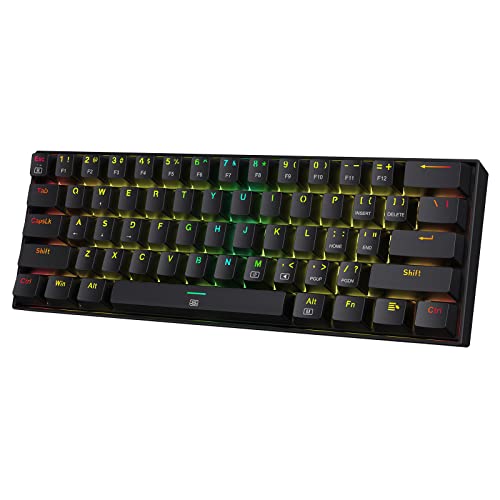
Redragon 60% Compact Wired Mechanical Keyboard
Best for: desk space saving and competitive gaming
- Switch Type
- Red Switch (what this guide is about)
- Form Factor
- 60%
- Connectivity
- Wired
- Backlighting
- RGB
- Use
- Gaming
- Color
- Black
View on Amazon: Redragon 60% Compact Wired Mechanical Keyboard
This keyboard gives you a 60-percent footprint with 61 keys and linear red switches. The hot-swappable design allows you to replace the stock switches with other compatible Redragon switches, while onboard controls support 11 RGB presets. At 1.1 pounds and 12.6 inches long, it clears desk area for broader mouse movements. It suits you if you need a compact, wired setup without numeric or navigation pads.
Pros
- Compact 60% layout with 61 keys
- Hot-swappable linear red switches rated for 50 million clicks
- Full N-key rollover (NKRO)
- Onboard RGB backlighting with 11 preset modes
- Software support for custom macros and keybindings
Cons
- Wired connectivity only without wireless options
- Lacks dedicated arrow keys, navigation keys, and number pad
- Switch hot-swapping specified for other Redragon switches
Good fit if
- You need maximum desk clearance for wide mouse sweeps.
- You want hot-swappable linear switches in a compact 61-key frame.
- You prefer a wired setup with customizable software macros.
Skip if
- You rely regularly on dedicated arrow keys or a numeric keypad.
- You require wireless connectivity like Bluetooth or 2.4 GHz.
Verdict: Redragon Dragonborn 60% Wired Red Switch Keyboard delivers a compact 61-key footprint that frees up desk room for mouse travel. Its hot-swappable linear switches and customizable RGB backlighting provide focused gaming functionality without surplus bulk.

Redragon One-Handed Hot-Swappable Mechanical Keypad
Best for: gamers wanting a compact hot-swappable keypad
- Switch Type
- Red Switch (what this guide is about)
- Form Factor
- One-Handed
- Connectivity
- Type-C
- Backlighting
- RGB
- Hot-Swap Support
- Hot-Swappable
- Use
- Gaming
View on Amazon: Redragon One-Handed Hot-Swappable Mechanical Keypad
This is a 42-key one-handed mechanical gaming keypad built with linear Redragon Red switches and hot-swappable sockets. It features a detachable magnetic wrist rest, a Type-C wired connection, a built-in USB pass-through port, and seven programmable macro keys for custom binds. If you want a dedicated gaming layout that clears desk space while letting you swap switches without soldering, this compact unit suits your desktop setup.
Pros
- Hot-swappable switch sockets for straightforward modifications
- Seven programmable macro keys for custom commands
- Detachable magnetic wrist rest for ergonomic support
- Built-in USB pass-through port and detachable Type-C cable
Cons
- Limited to 42 keys, lacking a standard typing layout
- Wired-only connection with no wireless options
Good fit if
- You want a dedicated 42-key layout specifically for gaming.
- You plan to replace or customize switches using hot-swap sockets.
- You need onboard macro keys and an included wrist rest.
Skip if
- You need a complete keyboard for general typing or office work.
- You prefer a wireless peripheral setup.
Verdict: Redragon One-Handed Hot-Swappable Mechanical Keypad delivers a streamlined 42-key layout with quiet Red switches, hot-swap sockets, and onboard macros. It gives you a focused gaming footprint if you do not require a full typing board.
Specifications side by side
| Spec | Redragon Wired Mechanical Keyboard with Red Switches | Redragon Wireless Full-Size Red Switch Keyboard | Redragon Full-Size Aluminum Red Switch Keyboard | Redragon Tenkeyless Red Switch Mechanical Keyboard | Redragon 60% Hot-Swap Mechanical Keyboard | Redragon 60% Compact Wired Mechanical Keyboard | Redragon One-Handed Hot-Swappable Mechanical Keypad |
|---|---|---|---|---|---|---|---|
| Switch Type | Red switch | Red | Red linear | Linear Red | Red | Linear Red | Redragon Red |
| Form Factor | not specified | not specified | 104-Key | 87-Key TKL | 60% (68 keys) | 60% | One-Handed |
| Connectivity | Wired | USB-C, Bluetooth, 2.4GHz wireless | Wired | USB wired | Wired USB-C | Wired | Type-C |
| Backlighting | RGB | RGB | RGB | Rainbow LED | RGB | RGB | RGB |
| Case Material | Aluminum alloy | not specified | Aluminum | Metal | not specified | not specified | not specified |
| Hot-Swap Support | not specified | not specified | Hot-Swappable | not specified | not specified | not specified | Hot-Swappable |
| Use | Gaming | Gaming | Gaming | Gaming | Gaming | Gaming | Gaming |
| Color | Navy Blue Black | Red Switch | Black | Black | not specified | Black | White |
| Game Genre | not specified | MMO | not specified | not specified | not specified | not specified | not specified |
| Operating System | Mac, Windows | not specified | not specified | not specified | Mac, Windows | not specified | not specified |
| Ergonomic Features | not specified | not specified | not specified | not specified | not specified | not specified | Wrist Rest |
| Noise Level | not specified | not specified | Silent | not specified | not specified | not specified | not specified |
| Dimensions | 17.1 × 4.8 × 1.31 inches | 15.8 × 5.91 × 0.98 inches | 17.1 × 4.9 × 1.6 inches | 354 × 123 × 37 inches | 13 × 4 × 1.42 inches | 12.6 × 5.91 × 1.97 inches | not specified |
| Weight | not specified | not specified | 2.6 pounds | 1.93 pounds | 1.31 pounds | 1.1 pounds | not specified |
| Size | Wired | K580 PRO Wireless | Red Switch | Wired LED | 68 key | Red Switch | Red Switch |
| Model | K565 | K580 PRO | K556 | K552 | K633CGO-RGB | K630 | K585 WIRED |
If you are also comparing related hardware, you can evaluate specifications for the best red electronic keyboards.
How to choose the right one
-
Check connectivity needs
Decide if you require a permanent wired link or wireless flexibility. The K580 PRO offers tri-mode connectivity for versatile setup options. Most other models, like the K565 and K552, rely on wired USB connections for consistent latency. Wired options often provide a more stable signal for competitive gaming. Wireless models may offer greater desk freedom but require charging. Choose based on whether you prioritize cable management or connection reliability for your specific desk environment.
-
Select your form factor
Layout size dictates desk space and functionality. Full-size boards like the K556 include a number pad for data entry. Tenkeyless models such as the K552 save space while retaining arrow keys. The 60% K633CGO-RGB removes the number pad but keeps dedicated arrows for navigation. The K630 is even more compact at 61 keys. The K585 is a single-handed keypad. Match the physical footprint to your available desk width and required key access.
-
Verify hot-swap support
Hot-swappable sockets allow you to change switches without soldering. This feature is present in the K580 PRO, K556, K633CGO-RGB, K630, and K585. It lets you experiment with different switch types later. Models like the K565 and K552 do not list this capability. If you plan to customize your typing feel over time, prioritize hot-swap compatibility. This spec offers long-term flexibility for your keyboard setup without needing new hardware.
-
Assess mounting style
Build material affects stability and sound. The K565 and K556 feature aluminum frames for rigidity. The K552 also uses a durable metal build. Plastic or standard chassis models may feel lighter. The K585 includes a wrist rest for ergonomic support. Heavier boards like the K556 weigh 2.6 pounds, reducing movement during intense gaming. Lighter models like the K630 weigh 1.1 pounds. Choose based on whether you prefer a solid, stationary feel or a lighter, portable design.
-
Confirm operating system
Ensure the keyboard supports your computer system. The K565 and K633CGO-RGB explicitly list compatibility with both Mac and Windows. Other models focus on general gaming use without specifying OS restrictions. Verify driver availability if you need advanced macro programming. Most Redragon keyboards work plug-and-play on Windows. Mac users should check for specific key mapping support. This ensures your function keys and shortcuts operate correctly across your preferred operating environment.
Frequently asked questions
Which Redragon keyboard has the most durable build?
The top-ranked Redragon Wired Mechanical Keyboard with Red Switches features a sturdy aluminum frame. This construction provides a rigid and durable chassis suitable for desktop gaming. It pairs this metal build with smooth linear red switches and full-key anti-ghosting for reliable performance in stationary setups.
Does any model offer wireless connectivity?
Yes, the Redragon Wireless Full-Size Red Switch Keyboard supports wireless connectivity. It offers versatile tri-mode connectivity, allowing you to connect via multiple methods. This model also includes hot-swap sockets and dedicated macro controls, making it a practical choice for users who want wireless freedom without a number pad.
Are there options with hot-swappable switches?
Several models feature hot-swappable switch sockets for easy customization. The Redragon Full-Size Aluminum Red Switch Keyboard includes these sockets across its 104-key layout. Additionally, the Redragon 60% Hot-Swap Mechanical Keyboard and the One-Handed Hot-Swappable Mechanical Keypad both offer hot-swap capabilities, allowing you to change switches without soldering.
Which is the best compact layout with arrow keys?
The Redragon 60% Hot-Swap Mechanical Keyboard is ideal for compact desks needing arrow keys. It packs hot-swappable red switches and dedicated arrows into a 68-key frame. This layout serves users who want a tight footprint without losing standard directional navigation, balancing desk space with essential functionality for Windows users.
What is the smallest keyboard footprint available?
The Redragon One-Handed Hot-Swappable Mechanical Keypad offers the most compact footprint. It features a streamlined 42-key layout with quiet Red switches and onboard macros. This focused gaming design is perfect if you do not require a full typing board and want to maximize desk space for mouse movement.
Can I use these keyboards with Mac?
Some models are compatible with Mac operating systems. The top-ranked Redragon Wired Mechanical Keyboard with Red Switches lists Mac as a supported operating system alongside Windows. The Redragon 60% Hot-Swap Mechanical Keyboard also supports both Mac and Windows, ensuring broader compatibility for users on different platforms.
Which model includes a wrist rest?
The Redragon One-Handed Hot-Swappable Mechanical Keypad includes a wrist rest as an ergonomic feature. This white model provides a streamlined 42-key layout with quiet Red switches and hot-swap sockets. The inclusion of a wrist rest adds comfort for users who spend extended time on this focused gaming keypad.
Do these keyboards have RGB backlighting?
Most models in this list feature RGB backlighting for customizable lighting. The top pick, the wireless K580 PRO, the aluminum K556, the 60% K633CGO-RGB, the compact K630, and the one-handed K585 WIRED all include RGB options. This allows you to adjust lighting effects to match your setup preferences.