6 Best Alternatives to the Corsair K65 Plus Wireless 75% (2026)
As an Amazon Associate we earn from qualifying purchases. Links on this page are affiliate links.
The Corsair K65 Plus Wireless 75% keyboard offers tri-mode connectivity, durable PBT keycaps, and smooth linear switches in a compact footprint. You might look for corsair k65 plus wireless 75 alternatives if you need a different form factor, a number pad, or specific mounting styles like gasket designs. Some buyers also prefer hot-swappable sockets or built-in displays for real-time status monitoring.
This list includes 6 options that share core specifications with the original model. All featured keyboards support wireless connectivity and mechanical linear switches. They also utilize PBT keycaps for long-term durability. The selection covers various layouts, from standard 75% designs to 96% and split ergonomic configurations. Each alternative overlaps with the Corsair unit in essential areas like connectivity type and switch style. You can choose based on your need for extra keys, specific mounting hardware, or unique features like OLED screens. The goal is to match your technical requirements without compromising on the fundamental specs that define a quality gaming keyboard.
How each alternative compares
AULA F75 Pro Wireless Mechanical Keyboard
The AULA F75 Pro shares the 75% layout and tri-mode wireless connectivity with the Corsair K65 Plus. It matches the PBT keycap material and linear switch profile, ensuring a similar tactile feel. You gain hot-swappable sockets, allowing you to change switches without soldering. The AULA unit is slightly wider and heavier, measuring 5.64 inches across and weighing 2.25 pounds. It also includes a multi-function dial for media control. If you prioritize switch customization and a lower price point over the Corsair brand, this compact option offers solid core features without extra bulk.
ASUS ROG Strix Scope II 96 Wireless
The ASUS ROG Strix Scope II 96 Wireless expands your layout to a 96% form factor, adding a numeric keypad. It retains the wireless connectivity, RGB backlighting, and PBT keycaps found on the Corsair. The switches are linear, but the keyboard is significantly larger at 14.8 inches long and 2.78 pounds. It offers hot-swap support for switch customization. You trade the compact footprint of the K65 Plus for full numeric functionality. This model suits users who need a number pad but want to stay within a relatively compact desk arrangement compared to standard full-size boards.
ASUS ROG Azoth 75% Wireless Mechanical Keyboard
The ASUS ROG Azoth 75% Wireless Keyboard differs in mounting style, using a gasket mount for distinct acoustics. It includes an OLED screen for system monitoring and a full switch-lubing toolkit for DIY tuning. Like the Corsair, it features wireless connectivity, RGB lighting, PBT keycaps, and linear switches. It is slightly longer at 12.8 inches and heavier at 2.6 pounds. The Azoth targets enthusiasts who want hardware monitoring and extensive customization options. You give up the simpler setup of the K65 Plus for a more complex, feature-dense mechanical keyboard experience.
LEOBOG Aula 75% Wireless Keyboard with Display
The LEOBOG Aula 75% Wireless Keyboard with Display includes a built-in smart display for on-board status tracking. It matches the 75% layout, tri-mode wireless, PBT keycaps, and linear switches of the Corsair K65 Plus. The unit measures 12.9 inches long and weighs 2.25 pounds. It also offers hot-swappable sockets for switch changes and a volume knob for media control. You gain visual feedback from the display, which the Corsair lacks. This alternative is ideal if you want direct status monitoring and a compact design with extensive customization potential.
Hexgears 75% Mechanical Keyboard with Wrist Rest
The Hexgears 75% Mechanical Keyboard with Wrist Rest includes an ergonomic wrist rest, which the Corsair K65 Plus does not. It shares the 75% layout, tri-mode wireless connectivity, PBT keycaps, and linear switches. The Hexgears unit supports hot-swappable switches and features a volume knob for media control. It is designed for Windows setups but also supports Mac. You gain dedicated ergonomic support and programmable keys. This option suits users who prioritize wrist comfort and media controls in a compact wireless keyboard package.
EPOMAKER Split70 Ergonomic Gasket Keyboard
The EPOMAKER Split70 Ergonomic Gasket Keyboard uses a split design and gasket mount for enhanced typing comfort. It shares the wireless connectivity, RGB backlighting, PBT keycaps, and linear switches with the Corsair. The split layout measures 14.7 inches in length and 4.65 inches in width per half. It offers hot-swappable sockets and a volume knob. You trade the unified compact form factor of the K65 Plus for ergonomic separation. This keyboard is best for users who prioritize long-term typing comfort and firmware customization over space efficiency.
Quick picks
Our 7 picks

Corsair K65 Plus Wireless 75% Keyboard
Best for: versatile wireless gaming with linear switches
- Switch Type
- Corsair MLX Red linear mechanical
- Form Factor
- 75%
- Connectivity
- 2.4GHz wireless, Bluetooth, USB wired
- Backlighting
- RGB
- Keycap Material
- Dye-sub PBT
- Use
- Gaming
The Corsair K65 Plus Wireless 75% Keyboard is a compact mechanical keyboard designed for gaming and typing. It provides tri-mode connectivity via 2.4GHz wireless with AES encryption, Bluetooth, or wired USB. You get pre-lubricated Corsair MLX Red linear mechanical switches, dye-sublimated PBT keycaps, and a multi-function rotary dial. With battery life rated up to 266 hours with RGB lighting turned off, this board suits you if you need a durable setup.
Pros
- Up to 266 hours of battery life with RGB turned off
- Tri-mode connectivity via 2.4GHz wireless, Bluetooth, or wired USB
- Pre-lubricated Corsair MLX Red linear mechanical switches
- Durable dye-sublimated PBT keycaps
- Integrated multi-function rotary dial
Cons
- Maximum 266-hour battery life requires turning RGB backlighting off
- 75% compact layout omits a dedicated numeric keypad
- Only listed with linear switches
Good fit if
- You want a 75% layout with a dedicated rotary dial for media control.
- You need tri-mode connection options including low-latency 2.4GHz with AES encryption.
- You prefer smooth, pre-lubricated linear mechanical switches.
Skip if
- You require a dedicated numpad for number-heavy work.
- You prefer tactile or clicky switches instead of linear key switches.
Verdict: Corsair K65 Plus Wireless 75% Keyboard provides versatile tri-mode connectivity, durable PBT keycaps, and smooth linear switches in a compact footprint. It delivers extensive battery runtime whenever you switch off the RGB backlighting.

AULA F75 Pro Wireless Mechanical Keyboard
Best for: multi-device wireless setups needing a compact layout
- Switch Type
- LEOBOG star vector linear
- Form Factor
- 75%
- Connectivity
- Bluetooth 5.0, 2.4GHz, USB wired
- Backlighting
- RGB
- Keycap Material
- PBT
- Hot-Swap Support
- Hot-Swappable
The AULA F75 Pro Wireless 75% Keyboard is a compact 81-key mechanical board built with tri-mode connectivity, hot-swappable switch sockets, and a multi-function control knob. You can connect across 2.4GHz wireless, Bluetooth 5.0, and wired USB to handle up to five devices. With a 4000mAh battery and pre-lubed linear switches cushioned by five internal sound-dampening layers, it suits you if you want a complete wireless 75% layout with minimal desk clutter.
Pros
- Tri-mode connectivity supports 2.4GHz wireless, Bluetooth 5.0, and USB wired pairing for up to five devices
- Hot-swappable PCB supports both 3-pin and 5-pin mechanical switches without soldering
- Internal 4000mAh rechargeable battery powers wireless operation
- Dual-mode hardware knob controls audio volume, media playback, and RGB backlighting
Cons
- Side-printed keycap legends may be harder to read from high viewing angles
- Weighs 2.25 pounds and stands 1.7 inches tall, adding bulk to transport
Good fit if
- You switch frequently between multiple wireless devices across PC, mobile, or console platforms
- You want hot-swappable 3-pin or 5-pin switch sockets to customize switches later
- You prefer dedicated volume and lighting control via a physical hardware knob
Skip if
- You need a dedicated numeric keypad for data entry
- You prefer standard top-printed keycap legends over side-engraved lettering
Verdict: AULA F75 Pro Wireless 75% Keyboard delivers tri-mode pairing, hot-swap flexibility, and a multi-function dial in a compact 81-key footprint. It provides a solid set of core mechanical keyboard features without taking up excessive desk space.

ASUS ROG Strix Scope II 96 Wireless
Best for: users needing a number pad in compact setups
- Switch Type
- ROG NX Snow linear
- Form Factor
- 96%
- Connectivity
- Bluetooth, 2.4GHz wireless, USB wired
- Backlighting
- RGB
- Keycap Material
- PBT
- Hot-Swap Support
- Hot-Swappable
The ASUS ROG Strix Scope II 96 Wireless is a compact 96 percent gaming keyboard designed for setups needing a dedicated number pad without taking standard full-size desk space. It features tri-mode wireless connectivity, factory-lubed hot-swappable ROG NX Snow linear switches, and up to 1,500 hours of battery life over 2.4GHz. This model suits you if you want a compact alternative to a 75 percent keyboard with full numeric input.
Pros
- Up to 1,500 hours of battery life via 2.4GHz wireless
- Tri-mode connectivity via Bluetooth, 2.4GHz RF, and USB
- Hot-swappable, pre-lubed ROG NX Snow linear switches
- 96 percent layout retains full number pad functionality
Cons
- Weighs 2.78 pounds, making it heavier than 75 percent alternatives
- At 14.8 inches wide, it occupies more desk width than standard tenkeyless boards
Good fit if
- You need a dedicated number pad while keeping desk footprint near tenkeyless size.
- You require extended battery runtimes reaching up to 1,500 hours on 2.4GHz wireless.
- You want hot-swappable switch sockets and multi-device Bluetooth pairing.
Skip if
- You prefer a strictly smaller 75 percent layout without a number pad.
- You want a lightweight keyboard under two pounds for frequent travel.
Verdict: ASUS ROG Strix Scope II 96 Wireless Keyboard delivers full-size numeric capability in a compact form factor with extensive battery runtime. It serves as a practical option if you need a number pad without committing to standard full-size dimensions.

ASUS ROG Azoth 75% Wireless Mechanical Keyboard
Best for: gamers wanting OLED controls and DIY tuning
- Switch Type
- ROG NX Snow linear
- Form Factor
- 75% TKL
- Connectivity
- Bluetooth, 2.4 GHz RF, USB
- Hot-Swap Support
- Yes (3-pin)
- Backlighting
- RGB
- Keycap Material
- Double-shot PBT
View on Amazon: ASUS ROG Azoth 75% Wireless Mechanical Keyboard
The ASUS ROG Azoth is a 75% TKL wireless keyboard equipped with a silicone gasket mount, triple-layer dampening foam, and pre-lubricated ROG NX Snow linear switches. You get tri-mode connectivity across 2.4 GHz RF, Bluetooth, and USB, along with an integrated 2-inch OLED display and control knob. It suits you if you want an enthusiast setup with bundled switch-lubing tools, hot-swappable 3-pin sockets, and double-shot PBT keycaps.
Pros
- Built-in 2-inch OLED display and multi-function control knob
- Tri-mode connectivity: Bluetooth, 2.4 GHz RF, and USB
- Silicone gasket mount with three layers of dampening foam
- Includes DIY switch-lubing kit with Krytox lubricant and tools
- Double-shot PBT keycaps and pre-lubed ROG NX switches
Cons
- Hot-swap PCB specifies compatibility only with 3-pin switches
- Heavy 2.6-pound build reduces portability
Good fit if
- You want an integrated OLED screen to monitor system hardware stats
- You plan to lube or swap your own switches using the included maintenance kit
- You need versatile tri-mode wireless connections across Windows and Mac devices
Skip if
- You need native support for 5-pin mechanical switches
- You prefer a lightweight keyboard to travel with regularly
Verdict: ASUS ROG Azoth 75% Wireless Keyboard provides an enthusiast gasket-mounted layout paired with an OLED screen and a full switch-lubing toolkit. It is a feature-dense alternative if you prioritize hardware monitoring and dampening foam.
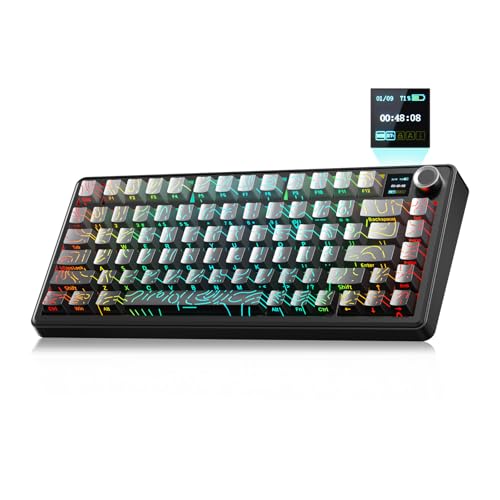
LEOBOG Aula 75% Wireless Keyboard with Display
Best for: on-board screen monitoring and wireless multitasking
- Switch Type
- LEOBOG Reaper linear
- Form Factor
- 75%
- Connectivity
- Bluetooth, 2.4GHz, USB-C wired
- Backlighting
- RGB
- Keycap Material
- PBT
- Hot-Swap Support
- Hot-Swappable
View on Amazon: LEOBOG Aula 75% Wireless Keyboard with Display
The LEOBOG 75% Wireless Keyboard with Smart Display gives you a compact layout paired with tri-mode connectivity, including 2.4GHz wireless, Bluetooth, and USB-C wired. It features hot-swappable LEOBOG Reaper linear switches on a gasket-mounted structure and draws power from a 4000mAh battery. An integrated TFT screen shows battery status and system info, while a metal knob controls volume and lighting. It suits you if you want visual hardware feedback.
Pros
- Tri-mode connectivity supporting 2.4GHz wireless, Bluetooth, and wired USB-C
- Built-in TFT smart screen displays battery level, system status, and custom GIFs
- Hot-swappable switch sockets paired with a cushioning gasket structure
- Dedicated aluminum alloy knob controls volume and RGB lighting adjustments
Cons
- Configuration software requires a wired connection and works only on Windows
- Compact 75% layout lacks a dedicated numeric keypad
Good fit if
- You want an on-board screen to check battery percentage and connection modes at a glance
- You need tri-mode wireless flexibility across PCs, tablets, and phones
- You prefer hot-swappable linear switches without soldering
Skip if
- You require keyboard software customization on macOS or over wireless modes
- You need a dedicated number pad for spreadsheet and numerical entry
Verdict: LEOBOG 75% Wireless Keyboard with Smart Display delivers flexible tri-mode wireless typing and direct status tracking through its built-in display. It provides a distinct alternative if you want on-board visual monitoring and hot-swappable parts in a 75% footprint.

Hexgears 75% Mechanical Keyboard with Wrist Rest
Best for: Windows setups needing an included wrist rest
- Switch Type
- Scarlet Cloud Switch - Linear
- Form Factor
- 75%
- Connectivity
- Bluetooth 5.0, 2.4GHz, USB wired
- Backlighting
- RGB
- Keycap Material
- PBT
- Hot-Swap Support
- Hot-Swappable
View on Amazon: Hexgears 75% Mechanical Keyboard with Wrist Rest
The Hexgears 75% Wireless Mechanical Keyboard provides an 82-key compact layout with tri-mode connectivity covering 2.4GHz wireless, Bluetooth 5.0, and USB wired modes. It features hot-swappable sockets compatible with 3-pin and 5-pin switches, pre-lubed linear switches, and a 4600mAh rechargeable battery. With its included magnetic wrist rest, shine-through PBT keycaps, and integrated volume knob, this board suits you if you need a flexible Windows-compatible setup for gaming and daily typing.
Pros
- Tri-mode connectivity supports 2.4GHz, Bluetooth 5.0, and USB wired connections across five devices
- Hot-swappable PCB accepts both 3-pin and 5-pin switches without soldering
- Includes a detachable magnetic wrist rest and dual-stage kickstands
- Equipped with a 4600mAh rechargeable battery
- Double-shot shine-through PBT keycaps with per-key RGB lighting
Cons
- Compact 82-key form factor lacks a dedicated numeric keypad
- Key remapping and custom lighting profiles require downloading separate driver software
Good fit if
- You want an included magnetic wrist rest with a compact 75% layout
- You switch between multiple wireless and wired devices using shortcut keys
- You prefer hot-swappable switch sockets and shine-through PBT keycaps
Skip if
- You need a full-size layout with a dedicated numpad for productivity tasks
- You prefer onboard macro configuration without installing driver software
Verdict: Hexgears 75% Wireless Mechanical Keyboard delivers versatile tri-mode connectivity, switch customization, and built-in ergonomic support via an included wrist rest. It offers a capable compact alternative with dedicated media controls and programmable keys.

EPOMAKER Split70 Ergonomic Gasket Keyboard
Best for: Ergonomic typing comfort and customization
- Switch Type
- Wisteria Linear V2
- Form Factor
- 70%
- Connectivity
- Bluetooth 5.0, 2.4GHz, USB-C
- Backlighting
- RGB
- Keycap Material
- PBT
- Hot-Swap Support
- Hot-Swappable
The EPOMAKER Split70 is a 70% gasket mount keyboard designed for ergonomic typing. It features a detachable split layout that allows you to position the halves for natural wrist alignment. The device includes a rotary knob, QMK/VIA programmability, and hot-swappable sockets for switch customization. Tri-mode connectivity supports Bluetooth, 2.4GHz, and USB-C connections. It uses a 3000mAh battery and south-facing RGB LEDs.
Pros
- Detachable split design for ergonomic wrist alignment
- QMK/VIA support for deep customization
- Gasket mount with five layers of padding
- Rotary knob for media and volume control
- Hot-swappable PCB for switch changes
Cons
- Split layout requires adjustment period
- Larger footprint than standard 70% boards
- No dedicated software app for configuration
Good fit if
- You want to reduce wrist strain
- You prefer customizable firmware like VIA
- You like gasket mount acoustics
Skip if
- You need a compact one-piece board
- You prefer plug-and-play simplicity
- You want a smaller footprint
Verdict: EPOMAKER Split70 Ergonomic 70% Keyboard suits users prioritizing comfort and firmware freedom over space efficiency. Its split design and gasket mount make it ideal for long typing sessions.
Specifications side by side
| Spec | Corsair K65 Plus Wireless 75% Keyboard | AULA F75 Pro Wireless Mechanical Keyboard | ASUS ROG Strix Scope II 96 Wireless | ASUS ROG Azoth 75% Wireless Mechanical Keyboard | LEOBOG Aula 75% Wireless Keyboard with Display | Hexgears 75% Mechanical Keyboard with Wrist Rest | EPOMAKER Split70 Ergonomic Gasket Keyboard |
|---|---|---|---|---|---|---|---|
| Switch Type | Corsair MLX Red linear mechanical | LEOBOG star vector linear | ROG NX Snow linear | ROG NX Snow linear | LEOBOG Reaper linear | Scarlet Cloud Switch - Linear | Wisteria Linear V2 |
| Form Factor | 75% | 75% | 96% | 75% TKL | 75% | 75% | 70% |
| Connectivity | 2.4GHz wireless, Bluetooth, USB wired | Bluetooth 5.0, 2.4GHz, USB wired | Bluetooth, 2.4GHz wireless, USB wired | Bluetooth, 2.4 GHz RF, USB | Bluetooth, 2.4GHz, USB-C wired | Bluetooth 5.0, 2.4GHz, USB wired | Bluetooth 5.0, 2.4GHz, USB-C |
| Hot-Swap Support | not specified | not specified | not specified | Yes (3-pin) | not specified | not specified | not specified |
| Backlighting | RGB | RGB | RGB | RGB | RGB | RGB | RGB |
| Keycap Material | Dye-sub PBT | PBT | PBT | Double-shot PBT | PBT | PBT | PBT |
| Mounting Style | not specified | not specified | not specified | not specified | not specified | not specified | Gasket Mount |
| Media Controls | not specified | not specified | not specified | not specified | Volume Knob | Volume Knob | Volume Knob |
| Use | Gaming | Gaming | Gaming | Gaming | Gaming | Gaming | Gaming |
| Design | not specified | not specified | not specified | not specified | not specified | not specified | Ergonomic |
| Color | Black/Gray | F75 Pro-Gradient Purple | Black | White | Gradient Grey | White-82keys | White |
| Operating System | Mac | not specified | Mac | Mac | not specified | Mac, Windows | Mac |
| Ergonomic Features | not specified | not specified | not specified | not specified | not specified | Wrist Rest | not specified |
| Dimensions | 12.6 × 5.35 × 1.37 inches | 12.7 × 5.64 × 1.7 inches | 14.8 × 5.16 × 1.57 inches | 12.8 × 5.3 × 1.5 inches | 12.9 × 5.62 × 1.69 inches | not specified | 14.7 × 4.65 × 1.56 inches |
| Weight | 2.02 pounds | 2.25 pounds | 2.78 pounds | 2.6 pounds | 2.25 pounds | not specified | not specified |
| Size | Compact | not specified | Snow Linear | Snow Linear (Mechanical) | not specified | Linear | not specified |
| Model | not specified | F75 Pro | X901 STRIX SCOPE II 96 WL/NXSW/CA/PBT | M701 ROG AZOTH/NXSW/CA/PBT/WHT | F75 MAX | not specified | Split70 |
If you are also planning a full PC build, review corsair cx650m 80 plus bronze alternatives for power supply specifications.
Frequently asked questions
Which corsair k65 plus wireless 75 alternatives include a number pad?
The ASUS ROG Strix Scope II 96 Wireless is the only option in this list that includes a numeric keypad. It uses a 96% full-size layout to provide essential number pad functionality while remaining more compact than a standard full-size board. This makes it a practical choice if you need numeric input without sacrificing too much desk space.
Can I swap switches on these wireless keyboards?
Most alternatives offer hot-swappable sockets for easy switch customization. The AULA F75 Pro, ASUS ROG Strix Scope II 96, ASUS ROG Azoth, LEOBOG 75%, Hexgears 75%, and EPOMAKER Split70 all support this feature. This allows you to change the switch type without soldering. The Corsair K65 Plus Wireless does not list hot-swap support in its specifications.
Do any alternatives have a built-in display or OLED screen?
Yes, the ASUS ROG Azoth 75% Wireless includes an OLED screen for hardware monitoring. The LEOBOG 75% Wireless Keyboard with Display also features a built-in screen for tracking status directly on the device. These displays provide visual feedback that standard keyboards lack, offering a distinct advantage for users who want on-board information without using software.
Which keyboard is best for ergonomic typing comfort?
The EPOMAKER Split70 Ergonomic Gasket Keyboard is designed specifically for comfort. Its split design separates the key clusters to reduce wrist strain during long sessions. It also uses a gasket mount for better dampening. The Hexgears 75% Mechanical Keyboard with Wrist Rest includes a dedicated wrist rest for added support, making it another strong option for ergonomics.
Are there wireless keyboards with a volume knob included?
Several alternatives provide a physical volume knob for direct media control. The LEOBOG 75% Wireless Keyboard with Display and the Hexgears 75% Mechanical Keyboard with Wrist Rest both include this feature. This allows you to adjust audio levels quickly without navigating software menus. The Corsair K65 Plus Wireless does not list a volume knob in its attributes.
Which alternative is the most compact besides the 75% layout?
The EPOMAKER Split70 Ergonomic Gasket Keyboard uses a 70% form factor, which is smaller than the 75% layout found in most other options. It measures 14.7 inches in length. This compact design is ideal if you prioritize saving desk space over retaining arrow keys or a full function row, offering a tighter footprint than the standard 75% boards.