9 Best Keychron RGB Mechanical Keyboards, Compared
As an Amazon Associate we earn from qualifying purchases. Links on this page are affiliate links.
Choosing the best keychron RGB mechanical keyboards requires comparing their published specifications. We evaluated 9 models to find the right fit for your setup. The Keychron V1 8K 75% Wired Keyboard leads this list because it offers hot-swappable switches for deep QMK customization. These picks are based strictly on the specs published on the listings. You will find options for wired stability, wireless convenience, and ergonomic layouts. This guide helps you decide which keyboard matches your specific needs for typing or gaming.
Quick picks
The best fit for you
- You want the best overall keyboard for gaming Keychron V1 8K 75% Wired Keyboard Its 75% form factor and red switches provide a compact, responsive wired setup.
- You prefer a premium metal build for typing Keychron Q6 Max Full-Metal Wireless This model features a full-metal chassis and a volume knob for control.
- You need a compact wireless keyboard for office use Keychron K6 Pro Wireless Mechanical Keyboard The 65% layout and wireless connectivity offer a small footprint for desks.
- You want an ergonomic Alice layout for comfort Keychron Q8 Alice 65% Barebone It uses a gasket mount and barebone design for an ergonomic fit.
- You require a full-size board with a numpad Keychron V6 8K Full-Size Mechanical Keyboard The full-size wired design includes a numpad and PBT keycaps.
Our 9 picks
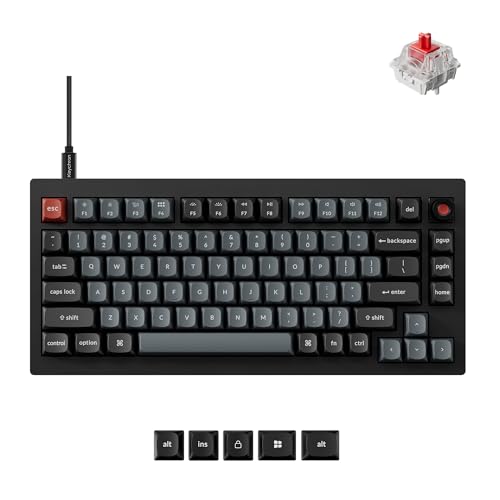
Keychron V1 8K 75% Wired Keyboard
Best for: Competitive gaming and QMK customization
- Backlighting
- RGB (what this guide is about)
- Switch Type
- Keychron Super Red
- Form Factor
- 75%
- Connectivity
- Wired
- Keycap Material
- Double-shot PBT
- Case Material
- Plastic
The Keychron V1 8K is a wired 75% mechanical keyboard designed for speed and customization. It features an 8000Hz polling rate for ultra-low latency, making it ideal for competitive gaming. The gasket-mounted plastic case provides a thocky sound profile, while hot-swappable Keychron Super switches allow for easy customization. South-facing RGB lighting and double-shot PBT keycaps ensure durability and visibility. It supports both macOS and Windows with QMK programmability.
Pros
- 8000Hz polling rate for near-zero latency
- Hot-swappable PCB for 3-pin and 5-pin switches
- Gasket-mounted design with sound-absorbing foam
- South-facing RGB with double-shot PBT keycaps
- QMK programmability via Keychron Web Launcher
Cons
- Wired connectivity only, no wireless option
- Plastic case may feel less premium than metal alternatives
- 75% layout lacks dedicated number pad
Good fit if
- You want ultra-low latency for competitive gaming
- You prefer a compact 75% layout with arrow keys
- You enjoy customizing switches and keymaps via QMK
Skip if
- You need wireless connectivity for a clutter-free desk
- You require a full-size keyboard with a number pad
- You prefer a metal case for a heavier build
Verdict: Keychron V1 8K 75% Wired Keyboard delivers high-speed performance and deep customization for gamers and typists who prioritize responsiveness and tactile feel over wireless convenience. Its compact form factor and robust switch options make it a strong choice for focused setups.

Keychron Q6 Max Full-Metal Wireless
Best for: Premium metal build enthusiasts
- Backlighting
- RGB (what this guide is about)
- Switch Type
- Hot-swappable (switches not included)
- Connectivity
- 2.4 GHz, Bluetooth, USB-C
- Case Material
- Full metal
- Media Controls
- Volume Knob
- Color
- Black
The Keychron Q6 Max is a full-metal, barebone mechanical keyboard with RGB backlighting. It supports QMK/VIA remapping and features a volume knob. You get dual wireless modes: 2.4 GHz with a 1000 Hz polling rate, and Bluetooth 5.1 for up to three devices. The hot-swappable PCB allows you to install almost any 3-pin or 5-pin MX-style switch without soldering. Its double-gasket design and acoustic foams aim to improve sound quality.
Pros
- Full metal body construction
- Hot-swappable switch support
- 1000 Hz polling rate on 2.4 GHz
- QMK/VIA programmable layout
- Integrated volume knob
Cons
- Barebone version requires separate switch purchase
- Lower 90 Hz polling rate on Bluetooth
- No included switches provided
Good fit if
- You want a premium all-metal build
- You need low-latency wireless for gaming
- You prefer tactile customization via QMK
Skip if
- You need a complete keyboard with switches
- You require a smaller than full-size layout
- You only use wired connections
Verdict: The Keychron Q6 Max Full-Metal Wireless Keyboard suits users who value a heavy metal chassis and precise wireless performance. It is ideal for those who want to build their own switch profile while maintaining high-speed connectivity.

Keychron K6 Pro Wireless Mechanical Keyboard
Best for: Compact wireless typing with hot-swap flexibility
- Backlighting
- RGB (what this guide is about)
- Switch Type
- Keychron K Pro Red
- Form Factor
- 65%
- Connectivity
- Bluetooth 5.1, wired
- Hot-Swap Support
- Hot-Swappable
- Use
- Office
View on Amazon: Keychron K6 Pro Wireless Mechanical Keyboard
The Keychron K6 Pro is a 65% wireless mechanical keyboard featuring Bluetooth 5.1 and wired connectivity. It uses hot-swappable Keychron K Pro Red switches and offers RGB backlighting. QMK/Launcher support allows key remapping via a web app. The build includes sound-absorbing foam and a steel plate for a quieter typing experience. It connects to up to three devices for seamless multitasking across Mac and Windows systems.
Pros
- Bluetooth 5.1 and wired connectivity options
- Hot-swappable MX mechanical switch support
- QMK/Launcher programmable macro customization
- Sound-absorbing foam and steel plate construction
Cons
- 65% layout lacks dedicated arrow keys and navigation cluster
- Key remapping requires wired connection mode
- No mention of battery capacity or wireless range
Good fit if
- You want a compact wireless keyboard with RGB lighting
- You need to remap keys using QMK/Launcher
- You prefer hot-swappable switches for customization
Skip if
- You require a full-size keyboard with numpad
- You need to remap keys while in wireless mode
- You prefer tactile or clicky switches over linear
Verdict: Keychron K6 Pro Wireless 65% RGB suits users who need a compact, customizable wireless keyboard with hot-swap capability. It fits those who value QMK/Launcher programming and a dampened typing sound in a small footprint.
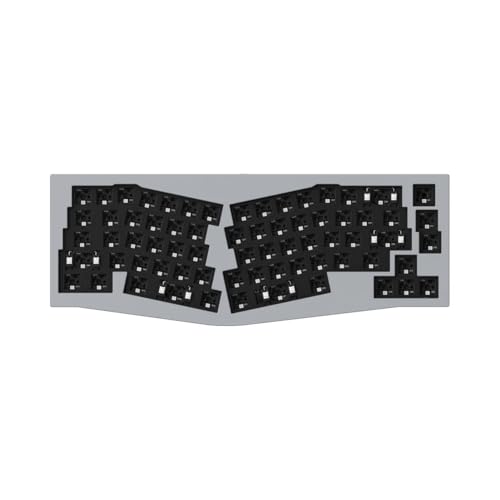
Keychron Q8 Alice 65% Barebone
Best for: Ergonomic Alice layout enthusiasts
- Backlighting
- RGB (what this guide is about)
- Form Factor
- 65% Alice Layout
- Connectivity
- USB wired
- Case Material
- CNC-machined aluminum
- Hot-Swap Support
- Hot-Swappable
- Mounting Style
- Gasket Mount
The Keychron Q8 is a wired, 65% Alice layout mechanical keyboard built with a CNC-machined aluminum body. It features a double-gasket mount and south-facing RGB backlighting for clear illumination. You get QMK programmability and hot-swappable sockets for 3-pin and 5-pin switches. This barebone kit requires you to purchase switches and keycaps separately. It suits users seeking an ergonomic, premium build with deep customization options.
Pros
- CNC-machined aluminum full metal body
- Double-gasket mount for improved typing sound
- Hot-swappable PCB for easy switch changes
- South-facing RGB LEDs for better lighting
- QMK firmware for full key remapping
Cons
- Barebone version excludes switches and keycaps
- Wired connection limits portability
- No wireless capability for mobile use
Good fit if
- You want an ergonomic Alice layout
- You prefer a heavy aluminum build
- You plan to customize switches and caps
Skip if
- You need a complete ready-to-use kit
- You require wireless Bluetooth connectivity
- You prefer a standard rectangular layout
Verdict: Keychron Q8 Alice 65% Barebone offers a premium aluminum build and ergonomic design for enthusiasts willing to assemble their own switches and keycaps.

Keychron 81 Pro 75% Wireless
Best for: Tactile switch enthusiasts
- Backlighting
- RGB (what this guide is about)
- Switch Type
- Tactile
- Form Factor
- 75%
- Connectivity
- Bluetooth, USB wired
- Case Material
- Aluminum
- Hot-Swap Support
- Hot-Swappable
The Keychron 81 Pro is a 75% wireless mechanical keyboard with a full aluminum body. It uses Winter Bonfire tactile switches with a 0.5 mm peak for precise feedback. The board supports QMK/VIA firmware for deep customization and hot-swappable sockets for easy switch changes. A volume knob and Bluetooth 5.1 connectivity round out the features. It suits users who want tactile feedback and a sturdy metal build.
Pros
- Full aluminum body construction
- Winter Bonfire tactile switches with 0.5 mm peak
- QMK/VIA programmable firmware
- Hot-swappable PCB for 3-pin and 5-pin switches
- Volume knob for media controls
Cons
- 75% layout lacks dedicated arrow keys
- No wired 8K polling rate option
- Bluetooth 5.1 connection instead of newer standards
Good fit if
- You prefer tactile switch feedback
- You want a metal keyboard body
- You need QMK/VIA customization
Skip if
- You need a full-size layout
- You require ultra-low latency gaming
- You prefer linear switch feel
Verdict: Keychron 81 Pro 75% Wireless is a solid choice for typists who value tactile feedback and a premium metal build. It fits users who prioritize customization and a compact footprint over raw gaming speed.

Keychron C1 Pro TKL 8K Silent Mechanical Keyboard
Best for: quiet office typing and high-speed gaming setups
- Backlighting
- RGB (what this guide is about)
- Switch Type
- K Pro Silent Red
- Form Factor
- TKL
- Connectivity
- Wired
- Keycap Material
- Double-shot PBT
View on Amazon: Keychron C1 Pro TKL 8K Silent Mechanical Keyboard
The Keychron C1 Pro 8K is a wired tenkeyless mechanical keyboard built with south-facing RGB backlighting. It features an 8000 Hz polling rate, pre-lubed K Pro Silent Red switches, and hot-swappable sockets. Compatible with QMK via the Keychron Launcher web app, this tenkeyless layout fits typists and gamers who want quiet operation and high reporting speeds at a desk.
Pros
- 8000 Hz polling rate for high-speed input reporting
- Hot-swappable sockets with pre-lubed K Pro Silent Red switches
- South-facing RGB lighting with double-shot PBT keycaps
- Full QMK customization support via Keychron Launcher web app
Cons
- Wired-only connection with no Bluetooth or wireless support
- Tenkeyless layout lacks a dedicated numeric keypad
Good fit if
- You need a silent mechanical switch setup for shared office spaces.
- You prioritize an 8000 Hz polling rate over wireless freedom.
- You want to customize keymaps using QMK without installing desktop software.
Skip if
- You need a wireless connection or Bluetooth multi-device pairing.
- You require a full-size layout with a dedicated number pad.
Verdict: Keychron C1 Pro 8K TKL RGB Keyboard delivers ultra-responsive 8000 Hz wired performance and quiet switches for shared workspaces. It fits gamers and typists who need low noise and open-source remapping without wireless capabilities.

Keychron V6 8K Full-Size Mechanical Keyboard
Best for: users needing a numpad and wired stability
- Backlighting
- RGB (what this guide is about)
- Switch Type
- Red Switch
- Form Factor
- Full Size
- Connectivity
- Wired Type-C
- Keycap Material
- Double-shot PBT
- Hot-Swap Support
- Hot-Swappable
View on Amazon: Keychron V6 8K Full-Size Mechanical Keyboard
The Keychron V6 8K is a full-size wired mechanical keyboard featuring an 8000 Hz polling rate for ultra-low latency. It includes a programmable volume knob and hot-swappable sockets for switch customization. The build uses double-shot PBT keycaps and acoustic foam for a stable, quiet typing experience. This model suits users who need a numpad and high-performance wired connectivity for gaming or productivity.
Pros
- 8000 Hz polling rate for minimal input lag
- Programmable rotary knob for media controls
- Hot-swappable sockets for easy switch changes
- Double-shot PBT keycaps resist shine
Cons
- Wired connection only via Type-C
- Full-size layout requires more desk space
- No wireless or Bluetooth capability
Good fit if
- You need a full-size layout with a numpad
- You prefer wired connections for consistent latency
- You want to customize switches without soldering
Skip if
- You need wireless connectivity for mobility
- You have limited desk space for a full-size board
- You require a compact tenkeyless or smaller layout
Verdict: Keychron V6 8K Full-Size Mechanical Keyboard is a robust wired option for users who prioritize a numpad and high polling rates. It fits those who need dedicated desk space and stable wired performance.

Keychron V3 TKL Knob Keyboard
Best for: Gaming on a compact wired setup
- Backlighting
- RGB (what this guide is about)
- Switch Type
- Keychron Apex Red (Linear)
- Form Factor
- 80% TKL
- Connectivity
- USB wired
- Keycap Material
- PBT
- Hot-Swap Support
- Hot-Swappable
The Keychron V3 8K is an 80% TKL wired mechanical keyboard designed for gaming. It features an 8000 Hz polling rate for near-zero input lag. The board includes a programmable knob and hot-swappable switches for customization. It comes with PBT keycaps and RGB backlighting. You get Mac and Windows compatibility with included keycaps for both systems.
Pros
- 8000 Hz polling rate for low latency
- Hot-swappable PCB for switch changes
- Programmable volume knob
- PBT keycaps with RGB backlighting
- Includes Mac and Windows keycaps
Cons
- Wired-only connectivity limits desk freedom
- Requires high-end processor for 8K rate
- No wireless option available
Good fit if
- You need a compact TKL layout for gaming
- You want hot-swappable switches for customization
- You use both Mac and Windows systems
Skip if
- You require wireless connectivity
- Your computer lacks a high-end processor
- You prefer a full-size numpad layout
Verdict: Keychron V3 8K TKL Wired Gaming Keyboard delivers high-speed wired performance for gamers who value desk space and customization. It fits users who need a compact board with a knob and hot-swap capability.

Keychron C3 Pro TKL Wired Mechanical Keyboard
Best for: Tactile typing and wired gaming setups
- Backlighting
- RGB (what this guide is about)
- Switch Type
- Keychron Super Brown
- Form Factor
- TKL (80%)
- Connectivity
- Wired
- Keycap Material
- Shine-through PBT
- Hot-Swap Support
- Hot-Swappable
View on Amazon: Keychron C3 Pro TKL Wired Mechanical Keyboard
The Keychron C3 Pro is a wired TKL mechanical keyboard featuring an 8000 Hz polling rate and QMK/VIA programmability. It uses Keychron Super Brown switches and includes hot-swappable sockets for easy customization. The build utilizes a gasket mount structure with acoustic foams and shine-through PBT keycaps paired with North-facing RGB lighting. This setup targets users who want high responsiveness and tactile feedback in a compact form factor.
Pros
- 8000 Hz polling rate for ultra-fast response
- QMK/VIA programmability with web app control
- Hot-swappable sockets for switch customization
- Shine-through PBT keycaps with RGB backlighting
Cons
- Wired connectivity only, no wireless option
- TKL layout lacks a number pad
- No dedicated display for status monitoring
Good fit if
- You prefer tactile Brown switches for typing
- You want high polling rates for gaming
- You need QMK/VIA customization via browser
Skip if
- You require wireless or Bluetooth connectivity
- You need a full-size layout with numpad
- You prefer linear Red switches over tactile
Verdict: The Keychron C3 Pro TKL Brown Switch delivers a responsive wired experience with 8000 Hz polling and tactile Brown switches, making it ideal for users who value customization and tactile feedback without needing wireless freedom.
Specifications side by side
| Spec | Keychron V1 8K 75% Wired Keyboard | Keychron Q6 Max Full-Metal Wireless | Keychron K6 Pro Wireless Mechanical Keyboard | Keychron Q8 Alice 65% Barebone | Keychron 81 Pro 75% Wireless | Keychron C1 Pro TKL 8K Silent Mechanical Keyboard | Keychron V6 8K Full-Size Mechanical Keyboard | Keychron V3 TKL Knob Keyboard | Keychron C3 Pro TKL Wired Mechanical Keyboard |
|---|---|---|---|---|---|---|---|---|---|
| Switch Type | Keychron Super Red | Hot-swappable (switches not included) | Keychron K Pro Red | not specified | Tactile | K Pro Silent Red | Red Switch | Keychron Apex Red (Linear) | Keychron Super Brown |
| Form Factor | 75% | not specified | 65% | 65% Alice Layout | 75% | TKL | Full Size | 80% TKL | TKL (80%) |
| Connectivity | Wired | 2.4 GHz, Bluetooth, USB-C | Bluetooth 5.1, wired | USB wired | Bluetooth, USB wired | Wired | Wired Type-C | USB wired | Wired |
| Backlighting | RGB | RGB | RGB | RGB | RGB | RGB | RGB | RGB | RGB |
| Keycap Material | Double-shot PBT | not specified | not specified | not specified | not specified | Double-shot PBT | Double-shot PBT | PBT | Shine-through PBT |
| Case Material | Plastic | Full metal | not specified | CNC-machined aluminum | Aluminum | not specified | not specified | not specified | not specified |
| Hot-Swap Support | Hot-Swappable | Hot-Swappable | Hot-Swappable | Hot-Swappable | Hot-Swappable | not specified | Hot-Swappable | Hot-Swappable | Hot-Swappable |
| Mounting Style | not specified | not specified | not specified | Gasket Mount | not specified | not specified | not specified | not specified | not specified |
| Media Controls | not specified | Volume Knob | not specified | not specified | Volume Knob | not specified | Volume Knob | Volume Knob | not specified |
| Use | not specified | not specified | Office | not specified | not specified | not specified | not specified | Gaming | not specified |
| Design | not specified | not specified | not specified | not specified | not specified | not specified | not specified | Ergonomic | not specified |
| Color | Keychron Red Switch | Black | Hot-swappable Keychron K Pro Red Switch | Grey | not specified | Swappable Silent Red Switch | Red Switch | Keychron Apex Red Switch | Brown Switch |
| Operating System | Mac, Windows | Mac, Windows | Mac, Windows | Mac, Windows | Mac, Windows | not specified | Mac, Windows | Mac, Windows | Mac, Windows |
| Noise Level | not specified | not specified | not specified | not specified | not specified | Silent | not specified | not specified | not specified |
| Dimensions | 12.9 × 5.85 × 1.01 inches | 17.6 × 5.39 × 12.8 inches | 12.3 × 4.09 × 1.57 inches | not specified | not specified | not specified | not specified | not specified | not specified |
| Weight | 1.54 pounds | not specified | not specified | not specified | not specified | not specified | not specified | not specified | not specified |
| Model | V1W-D1 | Q6M-M1 | K6P-H1 | not specified | OP-81P-T3 | C1PX-M6 | V6W-D1 | not specified | C3PX |
| Size | not specified | not specified | not specified | not specified | 75% | not specified | not specified | not specified | not specified |
If you are matching desktop lighting across your build, you can review specifications for the best heatsinks with RGB.
How to choose the right one
-
Check connectivity needs
Decide between wired stability and wireless freedom. Wired boards like the Keychron V1 offer 8000 Hz polling for low latency. This matters for competitive gaming where every millisecond counts. Wireless options like the Q6 Max provide Bluetooth freedom for a clutter-free desk. Consider your workflow. If you move your keyboard often, wireless is better. If you need consistent performance, stick with wired. Match the connection type to your daily habits.
-
Select the form factor
Your desk space dictates the right size. Full-size boards like the V6 include a numpad for data entry. Compact 75% layouts save space while keeping function keys. The Q6 Max offers a full-metal chassis in a standard size. Smaller 65% models like the K6 Pro fit tight setups. Choose based on how many keys you actually use. More keys mean less desk space. Less keys mean more mouse room. Pick the size that fits your physical environment.
-
Pick the switch type
Switches define the typing feel. Linear red switches, found in the V1, offer smooth keystrokes without resistance. This suits fast gaming. Tactile switches, like those in the 81 Pro, provide a bump for feedback. This helps typists know when a key actuates. Brown switches, seen in the C3 Pro, offer a middle ground. Silent switches, such as in the C1 Pro, reduce noise for shared offices. Test the feel you prefer before buying. Your fingers will thank you later.
-
Verify hot-swap support
Hot-swappable sockets let you change switches without soldering. This feature appears in most models here, including the V1 and Q6 Max. It allows you to experiment with different switch types easily. You can swap linear switches for tactile ones over time. This extends the keyboard life. If you plan to customize your typing feel, ensure the board supports hot-swapping. It offers flexibility that fixed boards lack. Check the specs to confirm this feature is present.
-
Consider mounting style
Mounting style affects the typing sound and feel. Gasket mount designs, like in the Q8 Alice, isolate the plate from the case. This creates a softer, more flexible typing experience. It dampens sound and reduces harshness. Other boards may use different mounting methods. Check the attributes for gasket mount details. This feature is key for enthusiasts who prioritize sound quality. It changes how the keyboard feels under your fingers. Look for this spec if you want a premium feel.
-
Check media controls
Volume knobs offer quick audio adjustments without software. The Q6 Max and 81 Pro include physical knobs. This is useful for gamers and office workers who adjust volume often. It provides tactile control that software sliders cannot match. Check if your preferred model includes this hardware feature. It saves time and improves workflow efficiency. If you rarely change volume, this may not matter. But for frequent users, a knob is a significant quality-of-life upgrade.
-
Ensure OS compatibility
Verify the keyboard supports your operating system. Most models here work with both Mac and Windows. The V1 and Q6 Max list both systems. This ensures you get the right keycaps and software. Check the attributes for your specific OS. Mismatched compatibility can lead to incorrect key mappings. Ensure the board includes the necessary drivers or software for your platform. This prevents frustration during setup. Always double-check the listed operating systems before purchasing.
Frequently asked questions
Which Keychron RGB keyboard is best for competitive gaming?
The Keychron V1 8K 75% Wired Keyboard is the top choice for competitive gaming. It delivers high-speed performance with an 8000 Hz polling rate. The wired connection ensures low latency. Its compact 75% form factor saves desk space while maintaining essential keys. Red switches provide a linear feel for rapid key presses.
Does Keychron offer wireless RGB mechanical keyboards?
Yes, Keychron offers several wireless options with RGB backlighting. The Keychron Q6 Max Full-Metal Wireless connects via Bluetooth. The Keychron K6 Pro Wireless provides a compact 65% layout. The Keychron 81 Pro 75% Wireless also supports Bluetooth connectivity. These models allow you to enjoy RGB lighting without cable clutter.
What is the difference between wired and wireless Keychron keyboards?
Wired keyboards like the Keychron V1 and C1 Pro offer stable, high-speed connections with 8000 Hz polling. This is ideal for gaming where latency matters. Wireless models like the Q6 Max and K6 Pro use Bluetooth for freedom. They require charging but remove cable constraints from your desk setup.
Are Keychron keyboards hot-swappable?
Most models in this list feature hot-swappable switch sockets. This includes the V1, Q6 Max, K6 Pro, Q8 Alice, 81 Pro, C1 Pro, V6, V3, and C3 Pro. Hot-swap support lets you change switches without soldering. You can customize the tactile feel or sound profile easily.
Which Keychron RGB keyboard is best for quiet typing?
The Keychron C1 Pro TKL 8K Silent Mechanical Keyboard is designed for quiet environments. It features silent red switches that reduce noise. This makes it suitable for shared offices or late-night typing. The wired connection ensures consistent performance without the need for wireless pairing.
Does Keychron provide Mac and Windows compatibility?
Yes, nearly all listed Keychron keyboards support both Mac and Windows operating systems. Models like the V1, Q6 Max, K6 Pro, and 81 Pro include compatibility for both platforms. This allows you to use the same keyboard across different devices. Key layouts and function keys adjust to your OS.
What form factors are available in Keychron RGB keyboards?
Keychron offers various form factors to fit your desk. Options include full-size with a numpad, like the V6. Compact 75% layouts are available in the V1 and 81 Pro. The K6 Pro uses a 65% layout. The Q8 Alice features an ergonomic 65% design. TKL options like the V3 and C3 Pro omit the numpad.
Do Keychron RGB keyboards have volume knobs?
Several models include a dedicated volume knob for media control. The Q6 Max, 81 Pro, V6, and V3 feature this hardware control. It allows you to adjust audio levels quickly without software. This adds convenience for users who frequently change volume during gaming or work sessions.