Looking Beyond the Logitech Wave Keys Ergonomic Wireless? 6 Alternatives Worth a Look
As an Amazon Associate we earn from qualifying purchases. Links on this page are affiliate links.
The Logitech Wave Keys Ergonomic Wireless Keyboard offers a compact wave layout, cushioned palm rest, and dual wireless connectivity for multi-device setups. If you need logitech wave keys ergonomic alternatives, consider options that prioritize different layouts or connectivity methods. Some buyers prefer a full-size keyboard with a numeric keypad, while others might want a split design for better forearm alignment. The original model provides up to three years of battery life and supports Bluetooth or the Logi Bolt receiver, but its compact footprint may not suit every desk.
The 6 alternatives listed here were chosen because their specifications overlap with the original product. Each option shares core ergonomic features like wrist support and wireless connectivity, yet differs in size, layout, or connection type. You might find a full-size wave layout, a dedicated vertical mouse combo, or a rechargeable split keyboard that better fits your workflow. These keyboards maintain the ergonomic focus while offering variations in dimensions, color, and operating system compatibility. Review the specs to determine which model aligns with your specific needs for desk space and typing comfort.
Our top pick: Logitech Wave Keys Wireless Ergonomic Keyboard.
How alternatives differ from Wave Keys
Logitech Ergo K860 Wireless Split Keyboard
The Logitech Ergo K860 replaces the compact wave layout with a full-size split design. It measures 18 inches wide, significantly larger than the Wave Keys at 14.8 inches. This split configuration separates the left and right key clusters to encourage a more natural forearm posture. It also features negative tilt adjustability, allowing you to angle the keyboard downward for better wrist alignment. Like the Wave Keys, it offers dual wireless connectivity via Bluetooth and a receiver. However, it lacks the compact footprint, making it better suited for desks with ample space rather than tight workstations.
Perixx Wireless Mini Split Keyboard and Vertical Mouse
The Perixx Wireless Mini Split Keyboard and Vertical Mouse provides a compact split membrane deck paired with an adjustable vertical mouse. It shares the wireless connectivity and ergonomic wrist rest features of the Wave Keys but adds a dedicated mouse in one package. At 13.8 inches long, it is slightly shorter than the Wave Keys. This bundle is designed for Windows users who want a complete ergonomic setup without buying peripherals separately. It uses a single USB receiver for both devices, simplifying your desk by reducing the number of dongles needed compared to the Wave Keys' potential multi-device switching.
Arteck Split Ergonomic Wireless Keyboard
The Arteck Split Ergonomic Wireless Keyboard features a rechargeable internal battery, whereas the Wave Keys relies on disposable batteries for up to three years of life. It offers a split key layout and cushioned wrist support similar to the Wave Keys but connects via 2.4G wireless only. It measures 16.5 inches long, making it wider than the compact Wave Keys. This model is ideal for Windows users who prefer the convenience of recharging over battery replacement. It lacks the multi-device switching capability of the Wave Keys, focusing instead on a straightforward, reliable connection for a single primary computer.
EAYBLLY Full-Size Wireless Ergonomic Keyboard
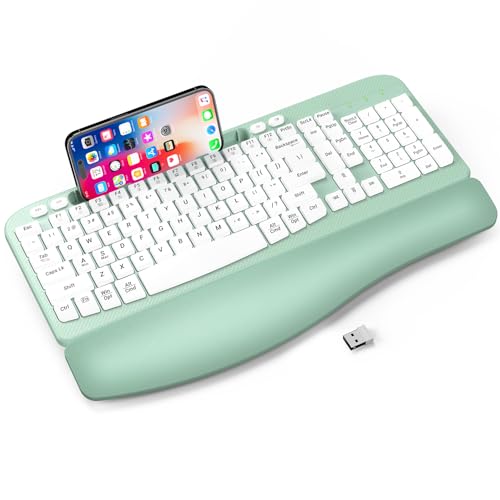
The EAYBLLY Full-Size Wireless Ergonomic Keyboard includes an integrated mobile device slot, a feature absent in the Wave Keys. It combines a wave layout with full-size dimensions, measuring 16.6 inches long. It connects via 2.4GHz wireless and includes a USB-C adapter for easy docking. This model supports both Mac and Windows operating systems. It is best for users who need to frequently place a phone or tablet near their keyboard for quick reference. While it offers similar cushioned wrist support, the integrated slot and larger footprint make it a dedicated desktop solution rather than a portable or multi-device focused tool.
MEETION Wireless Wave Ergonomic Keyboard
The MEETION Wireless Wave Ergonomic Keyboard uses a traditional one-piece wave profile rather than a split design. It connects via dedicated USB-A and USB-C 2.4GHz ports, eliminating the need for a separate receiver or Bluetooth pairing. It measures 17.4 inches square, offering a substantial footprint compared to the Wave Keys. This model is designed for users who want a stable, plug-and-play experience without managing multiple connection methods. It provides ergonomic typing for Windows and Mac setups but lacks the compact size and multi-device switching features that define the Wave Keys experience.
EDJO Wireless Ergonomic Keyboard with Wrist Rest
The EDJO Wireless Ergonomic Keyboard with Wrist Rest includes a numeric keypad, which the compact Wave Keys omits. It offers a wide palm rest and a dedicated 2.4GHz wireless connection. At 15.4 inches long, it is larger than the Wave Keys. This model is practical for users who require full-size functionality, including number entry, without relying on Bluetooth. It prioritizes a stable wireless link over multi-device compatibility. If you need a dedicated number pad and a broad support surface, this keyboard provides those elements, though it sacrifices the compact form factor and app-based customization options found in the Wave Keys.
Quick picks
Our 7 picks

Logitech Wave Keys Wireless Ergonomic Keyboard
Best for: compact multi-device ergonomic typing setups
- Connectivity
- Bluetooth, Logi Bolt Receiver
- Design
- Ergonomic
- Operating System
- Mac, Windows
- Ergonomic Features
- Wrist Rest
- Dimensions
- 14.8 × 8.62 × 1.18 inches
- Weight
- 2.16 pounds
View on Amazon: Logitech Wave Keys Wireless Ergonomic Keyboard
Logitech Wave Keys Wireless Ergonomic Keyboard gives you a curved wave layout paired with an integrated memory foam palm rest. You connect using Bluetooth or the included Logi Bolt USB receiver, switching between paired devices via Easy-Switch across Windows, macOS, iPadOS, and ChromeOS. It measures 14.8 inches long, weighs 2.16 pounds, and delivers up to 3 years of battery life. It suits you if you want ergonomic alignment in a compact footprint.
Pros
- Up to 3 years of battery life
- Dual wireless connectivity via Bluetooth and Logi Bolt receiver
- Cushioned palm rest with integrated memory foam
- Easy-Switch support across Windows, macOS, iPadOS, and ChromeOS
Cons
- No wired connection option listed
- No key backlighting listed
Good fit if
- You need multi-device switching between computers, tablets, or phones.
- You want built-in memory foam wrist support without adding separate rests.
- You prefer a curved wave key layout over a fully split keyboard.
Skip if
- You need a wired USB connection for your setup.
- You require backlit keys for typing in dark rooms.
Verdict: Logitech Wave Keys Wireless Ergonomic Keyboard pairs dual wireless connectivity with a compact wave layout and cushioned palm support. It delivers a reliable ergonomic setup with up to 3 years of battery life.

Logitech Ergo K860 Wireless Split Keyboard
Best for: full-size ergonomic typing with negative palm tilt
- Form Factor
- Full-size
- Connectivity
- Bluetooth, USB receiver
- Case Material
- Plastic
- Design
- Ergonomic
- Operating System
- Mac, Windows
- Ergonomic Features
- Wrist Rest
The Logitech Ergo K860 Wireless Split Keyboard is a full-size ergonomic keyboard featuring a curved, split keyframe and an integrated pillowed wrist rest. It connects via Bluetooth or a USB receiver and includes adjustable palm lift legs offering 0, -4, and -7 degrees of tilt. If you want a dedicated split layout with scooped keys and negative tilt options for seated or standing desks, this full-size board suits your daily typing setup.
Pros
- Curved split keyframe with scooped Perfect Stroke keys
- Adjustable palm lift with 0, -4, and -7 degree tilt legs
- Pillowed wrist rest with an integrated memory foam layer
- Dual wireless connectivity using Bluetooth or a USB receiver
Cons
- Large footprint measuring 18 inches wide and 9.17 inches deep
- Total weight of 2.56 pounds limits easy portability
Good fit if
- You want a true split keyframe design rather than a single unified wave
- You need negative palm tilt angles of -4 or -7 degrees for standing or seated setups
- You prefer dual wireless pairing via Bluetooth and a USB receiver
Skip if
- You have a small desk surface that cannot accommodate an 18-inch wide chassis
- You require a lightweight keyboard designed for travel
Verdict: Logitech Ergo K860 Wireless Split Keyboard provides a full-size split layout with negative tilt adjustability and dual wireless support. It is a capable option if you have adequate desk space and prioritize structured forearm posture.

Perixx Wireless Mini Split Keyboard and Vertical Mouse
Best for: Windows users wanting a compact ergonomic combo
- Switch Type
- Membrane low profile
- Form Factor
- Mini
- Connectivity
- 2.4 GHz wireless
- Design
- Ergonomic
- Color
- Black
- Shape
- Vertical
View on Amazon: Perixx Wireless Mini Split Keyboard and Vertical Mouse
This compact wireless package pairs a split membrane keyboard with a vertical mouse using a single shared 2.4 GHz USB receiver. You get an arched typing layout without a number pad, an adjustable palm rest with a magnetic riser, and adjustable mouse tracking up to 1600 DPI. It fits you if you want an ergonomic desk setup designed specifically for Windows systems.
Pros
- Includes both a split keyboard and a 5-button vertical mouse
- Single nano USB receiver operates both peripherals up to 33 feet
- Mouse sensor switches between 800, 1200, and 1600 DPI
- Includes a palm rest stand with a movable magnet for elevation
Cons
- No built-in numeric keypad
- Compatibility limited to Windows operating systems
- No Bluetooth connectivity option
Good fit if
- You want a matched split keyboard and vertical mouse combo
- You use a Windows 7, 8, 10, or 11 computer
- You prefer a compact keyboard footprint without a number pad
Skip if
- You require a dedicated number pad for numerical data entry
- You need Bluetooth connectivity for mobile devices
- You run macOS or non-Windows operating systems
Verdict: Perixx Wireless Mini Ergonomic Keyboard and Mouse delivers a compact split membrane deck and an adjustable vertical mouse over one shared USB receiver. It provides ergonomic positioning for Windows users who do not need a numeric keypad.

Arteck Split Ergonomic Wireless Keyboard
Best for: Windows users seeking a rechargeable split keyboard
- Connectivity
- 2.4G USB wireless
- Design
- Ergonomic
- Color
- Black
- Ergonomic Features
- Wrist Rest
- Dimensions
- 16.5 × 9.6 × 1.02 inches
This keyboard provides a split ergonomic layout paired with an integrated cushioned palm rest to support wrist posture. It connects via a 2.4G nano USB receiver and includes a built-in rechargeable lithium battery rated for six months of operation at two hours of daily typing. It suits you if you want a dedicated Windows split keyboard with USB-C recharging and straightforward plug-and-play wireless connectivity.
Pros
- Split ergonomic key layout with built-in cushioned wrist rest
- Rechargeable lithium battery with included USB-C charging cable
- Rated for six months of battery life on a single charge
- Includes 2.4G nano USB receiver with onboard rear storage
Cons
- No Bluetooth connectivity listed
- Compatibility listed only for Windows systems
Good fit if
- You type on a Windows desktop or laptop computer
- You prefer a rechargeable battery charged over USB-C
- You want a split layout with a fixed cushioned palm rest
Skip if
- You need Bluetooth connectivity for multiple devices
- You use non-Windows operating systems
Verdict: Arteck Split Ergonomic Wireless Keyboard delivers a split key layout and cushioned wrist support powered by an internal rechargeable battery. It provides reliable 2.4G wireless input for Windows setups without requiring disposable batteries.
EAYBLLY Full-Size Wireless Ergonomic Keyboard
Best for: full-size typing with integrated device docking
- Form Factor
- Full-size
- Connectivity
- 2.4GHz wireless
- Use
- Office
- Design
- Ergonomic
- Operating System
- Mac, Windows
- Ergonomic Features
- Wrist Rest
View on Amazon: EAYBLLY Full-Size Wireless Ergonomic Keyboard
This full-size wireless keyboard from EAYBLLY pairs a curved wave layout with an integrated three-layer memory foam wrist rest. It connects via a 2.4GHz USB receiver with an included USB-C adapter, and features a built-in 7.28-inch device slot for phones or small tablets. With dual 8-degree and 12-degree tilt adjustments and full-size spacing, it suits you if you need dedicated navigation keys and a number pad for daily desktop work.
Pros
- Built-in 7.28-inch slot holds phones and small tablets
- Integrated three-layer memory foam wrist rest
- Includes USB-C adapter alongside the 2.4GHz receiver
- Dual tilt legs provide 8° and 12° angles
Cons
- Requires one AA battery that is not included
- No Bluetooth connectivity listed
- 9.01-inch depth requires substantial desk space
Good fit if
- You want a full-size wave keyboard with an integrated phone or tablet holder.
- You need both USB-A and USB-C connection options for 2.4GHz wireless.
- You prefer built-in memory foam wrist support with adjustable 8° or 12° tilt.
Skip if
- You need direct Bluetooth pairing without using a USB receiver.
- You have a shallow desk that cannot fit a 9.01-inch deep keyboard.
Verdict: EAYBLLY Full-Size Ergonomic Wireless Keyboard combines a wave layout, cushioned wrist support, and an integrated mobile device slot for standard desktop setups. Its 2.4GHz connection and included USB-C adapter make it easy to plug into modern workstations without extra hubs.

MEETION Wireless Wave Ergonomic Keyboard
Best for: USB-based Windows and Mac wave typing
- Switch Type
- Membrane
- Form Factor
- Full-size
- Connectivity
- 2.4GHz wireless
- Design
- Ergonomic
- Color
- Black
- Operating System
- Mac, Windows
The MEETION Wireless Wave Ergonomic Keyboard provides a continuous wave-shaped key layout with standard membrane switches and an integrated hard plastic wrist rest. It links via a 2.4GHz wireless USB receiver or included USB-C adapter instead of Bluetooth. Dual-system key legends support Windows and macOS. This layout suits you if you need ergonomic wrist positioning without adjusting to a fully split keyboard.
Pros
- Includes 2.4GHz USB-A receiver plus USB-C adapter
- Integrated hard plastic wrist rest for firm support
- Dual-layout shortcuts for Windows and macOS
- Wave key arrangement requires no split-keyboard adaptation
Cons
- Lacks Bluetooth connectivity
- Requires two AAA batteries not included in the box
- Incompatible with Chrome OS, Linux, iOS, and Android
Good fit if
- You want a wave-shaped key profile with standard membrane action.
- You need both USB-A and USB-C connection options via 2.4GHz wireless.
- You switch between Windows and macOS setups using key shortcuts.
Skip if
- You need Bluetooth connectivity for mobile devices or tablets.
- You run Chrome OS or Linux operating systems.
- You prefer a cushioned palm rest over hard plastic.
Verdict: MEETION Wireless Wave Ergonomic Keyboard delivers a traditional one-piece wave profile with dedicated USB-A and USB-C 2.4GHz connectivity. It offers practical ergonomic typing for desktop setups that do not rely on Bluetooth.

EDJO Wireless Ergonomic Keyboard with Wrist Rest
Best for: Users needing a numeric keypad and palm rest
- Connectivity
- 2.4GHz wireless
- Design
- Ergonomic
- Color
- Black
- Ergonomic Features
- Wrist Rest
- Dimensions
- 15.4 × 9.04 × 1.89 inches
View on Amazon: EDJO Wireless Ergonomic Keyboard with Wrist Rest
The EDJO wireless ergonomic keyboard features wave-shaped keys and a wide palm rest for medium to large hands. It connects via 2.4GHz wireless up to 33 feet with a USB nano receiver. The layout includes a numeric keypad and 12 multimedia shortcuts. It supports both Mac and Windows systems. This keyboard suits users who need dedicated number keys and reliable connectivity without Bluetooth pairing.
Pros
- Wave-shaped keys fit natural hand curves
- Wide palm rest supports wrists
- Includes numeric keypad and multimedia keys
- 2.4GHz wireless connection up to 33 feet
- Dual layout for Mac and Windows
Cons
- Requires AA battery, which is not included
- No Bluetooth connectivity option
- Only one wireless connection mode
Good fit if
- You need a numeric keypad for data entry
- You prefer a wide palm rest for support
- You want a simple plug-and-play wireless setup
Skip if
- You require Bluetooth connectivity
- You need a rechargeable battery with no consumables
- You prefer a compact layout without number keys
Verdict: EDJO Wireless Ergonomic Keyboard with Wrist Rest is a practical option for users who need a numeric keypad and a wide palm rest. It fits those who prefer a dedicated 2.4GHz wireless connection over Bluetooth.
Specifications side by side
| Spec | Logitech Wave Keys Wireless Ergonomic Keyboard | Logitech Ergo K860 Wireless Split Keyboard | Perixx Wireless Mini Split Keyboard and Vertical Mouse | Arteck Split Ergonomic Wireless Keyboard | EAYBLLY Full-Size Wireless Ergonomic Keyboard | MEETION Wireless Wave Ergonomic Keyboard | EDJO Wireless Ergonomic Keyboard with Wrist Rest |
|---|---|---|---|---|---|---|---|
| Switch Type | not specified | not specified | Membrane low profile | not specified | not specified | Membrane | not specified |
| Form Factor | not specified | Full-size | Mini | not specified | Full-size | Full-size | not specified |
| Connectivity | Bluetooth, Logi Bolt Receiver | Bluetooth, USB receiver | 2.4 GHz wireless | 2.4G USB wireless | 2.4GHz wireless | 2.4GHz wireless | 2.4GHz wireless |
| Case Material | not specified | Plastic | not specified | not specified | not specified | not specified | not specified |
| Use | not specified | not specified | not specified | not specified | Office | not specified | not specified |
| Design | Ergonomic | Ergonomic | Ergonomic | Ergonomic | Ergonomic | Ergonomic | Ergonomic |
| Color | Graphite | Graphite | Black | Black | Mint Green | Black | Black |
| Shape | not specified | not specified | Vertical | not specified | not specified | not specified | not specified |
| Operating System | Mac, Windows | Mac, Windows | not specified | not specified | Mac, Windows | Mac, Windows | not specified |
| Ergonomic Features | Wrist Rest | Wrist Rest | Wrist Rest | Wrist Rest | Wrist Rest | Wrist Rest | Wrist Rest |
| Dimensions | 14.8 × 8.62 × 1.18 inches | 9.17 × 18 × 1.89 inches | 13.8 × 8.94 × 2.56 inches | 16.5 × 9.6 × 1.02 inches | 16.6 × 9.01 × 1.37 inches | 17.4 × 17.4 × 1.81 inches | 15.4 × 9.04 × 1.89 inches |
| Weight | 2.16 pounds | 2.56 pounds | 1.6 pounds | not specified | not specified | not specified | not specified |
| Model | 920-011898 | 920-009166 | 11660 | HW315 | QA812 | DirectorD-KB | not specified |
| Size | not specified | One Size | compact | not specified | not specified | not specified | not specified |
If you also need chair specifications, you can compare hon wave big tall ergonomic alternatives for your workspace layout.
Frequently asked questions
Which logitech wave keys ergonomic wireless alternative is best for a compact multi-device setup?
The Logitech Wave Keys Wireless Ergonomic Keyboard remains the top choice for compact multi-device setups. It features a wave layout with cushioned palm support and dual wireless connectivity. The device measures 14.8 inches in length and weighs 2.16 pounds, making it easy to position on any desk. It offers up to 3 years of battery life for reliable daily use.
What is the best full-size ergonomic keyboard alternative to the Logitech Wave Keys?
The EAYBLLY Full-Size Wireless Ergonomic Keyboard is the best full-size option. It combines a wave layout with an integrated mobile device slot and cushioned wrist support. This keyboard measures 16.6 inches in length and connects via 2.4GHz wireless with a USB-C adapter. It is compatible with both Mac and Windows operating systems for standard desktop use.
Is there a split keyboard alternative for users who need more desk space?
The Logitech Ergo K860 Wireless Split Keyboard provides a full-size split design for structured forearm posture. It measures 18 inches wide, which is significantly larger than the Wave Keys. This model includes negative tilt adjustability and dual wireless support. It is ideal for users who have adequate desk space and prioritize a split key configuration.
Which ergonomic keyboard is best for Windows users on a budget?
The Perixx Wireless Mini Split Keyboard and Vertical Mouse is the best budget option for Windows users. It delivers a compact split membrane deck and an adjustable vertical mouse over one shared USB receiver. This combo measures 13.8 inches in length and weighs 1.6 pounds. It provides ergonomic positioning without requiring a numeric keypad.
Are there rechargeable split keyboard alternatives to the Logitech Wave Keys?
The Arteck Split Ergonomic Wireless Keyboard is a strong rechargeable alternative. It features a split key layout and cushioned wrist support powered by an internal rechargeable battery. This model measures 16.5 inches in length and provides reliable 2.4G wireless input. It is designed for Windows setups and eliminates the need for disposable batteries.
Which keyboard is best for users who need a numeric keypad?
The EDJO Wireless Ergonomic Keyboard with Wrist Rest is ideal for users needing a numeric keypad. It features a wide palm rest and a dedicated 2.4GHz wireless connection. This model measures 15.4 inches in length and 9.04 inches in width. It fits those who prefer a direct wireless connection over Bluetooth and require full-size input capabilities.
What is a good USB-based wave keyboard for Windows and Mac?
The MEETION Wireless Wave Ergonomic Keyboard offers traditional one-piece wave typing with dedicated USB-A and USB-C connectivity. It measures 17.4 inches in both length and width, providing a square footprint. This model connects via 2.4GHz wireless and is suitable for desktop setups that do not rely on Bluetooth. It supports both Windows and Mac users.