6 Best Alternatives to the Razer BlackWidow V4 Low Profile (2026)
As an Amazon Associate we earn from qualifying purchases. Links on this page are affiliate links.
The Razer BlackWidow V4 Low Profile Wireless keyboard excels at providing tactile feedback with a premium aluminum build and flexible wireless connectivity. If you are searching for razer blackwidow v4 low profile alternatives, you might want a different form factor, switch type, or brand. Some users prefer a compact layout for smaller desks, while others prioritize hot-swappable switches for easy customization. Others may need a wired connection for zero-latency competitive gaming or a lower price point without sacrificing core features.
We selected these 6 options because their specifications overlap with the original product’s strengths. Each alternative offers distinct advantages, such as gasket mounting for better sound, OLED screens for monitoring, or adjustable actuation for precision. This list helps you find the right keyboard based on your specific needs, whether you value a 75% layout, a volume knob, or dual wireless modes. You can compare the specs to see which model fits your workflow and setup best.
How alternatives compare to Razer
ASUS ROG Azoth 75% Wireless Mechanical Keyboard
The ASUS ROG Azoth 75% White uses a gasket mount for a distinct typing feel compared to the Razer’s rigid aluminum top case. It features an OLED screen for real-time monitoring, which the Razer lacks. While the Razer offers a multi-function roller, the Azoth provides hot-swappable switches and PBT keycaps for customization. The Azoth is taller at 3.15 inches versus the Razer’s 1.37 inches. It suits users who prioritize sound quality and tactile feedback over a low-profile design. The white color option also contrasts with the Razer’s black finish.
EPOMAKER x Aula F75 75% Wireless Keyboard
The EPOMAKER x Aula F75 75% Wireless Keyboard offers a compact gasket mount design, differing from the Razer’s full-size layout. It includes a volume knob for media control, similar to the Razer’s roller but more traditional. The F75 is hot-swappable, allowing you to change switches easily, whereas the Razer has fixed low-profile green switches. At 1.7 inches high, it is taller than the Razer’s 1.37 inches. It weighs 2.2 pounds, lighter than the Razer. This keyboard fits users seeking a quiet, customizable typing experience with long battery life in a smaller footprint.
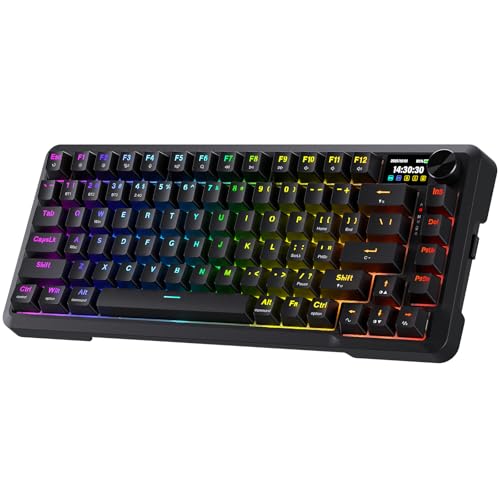
Redragon 81-Key Wireless Gasket Keyboard with Screen
The Redragon 81-Key Wireless Gasket Keyboard combines gasket mounting with an LCD screen, features absent in the Razer model. It includes a volume knob for hardware media control, offering a different approach to the Razer’s clickable roller. The Redragon is an 81-key layout, providing a compact alternative to the Razer’s larger size. It is designed for users who value hardware controls and a unique screen interface over the Razer’s dedicated macro buttons. The gasket mount provides a distinct typing feel compared to the Razer’s solid aluminum construction. It is a budget-friendly option with similar wireless connectivity.
SteelSeries Apex Pro TKL Gen 3 Wireless
The SteelSeries Apex Pro TKL Gen 3 Wireless offers analog adjustable actuation, a feature the Razer does not provide. It supports dual wireless options, including Bluetooth, similar to the Razer’s Hyperspeed and Bluetooth connectivity. The Apex Pro is a TKL layout, saving space compared to the Razer’s full-size design. It weighs 3.61 pounds, comparable to the Razer. This keyboard suits competitive gamers who need precise control over actuation points. The analog switches allow for customizable depth, offering a different interaction style than the Razer’s fixed tactile switches. It is a strong choice for those prioritizing adjustable performance.
Logitech G PRO X TKL Wireless Keyboard
The Logitech G PRO X TKL Wireless Keyboard is a compact TKL layout, significantly smaller than the Razer’s full-size design. It weighs only 5.29 ounces, much lighter than the Razer’s heavier build. The PRO X features tactile switches for gaming, similar to the Razer’s tactile feedback. It offers versatile wireless connectivity for tournament-ready performance. The compact form factor makes it ideal for users with limited desk space. While it lacks the Razer’s multi-function roller and dedicated macro buttons, it excels in portability and reliable wireless speed. It is a solid choice for players who value a smaller footprint and tactile response.
Razer BlackWidow V4 Pro Tactile Gaming Keyboard
The Razer BlackWidow V4 Pro Tactile Gaming Keyboard uses a wired connection, unlike the Razer BlackWidow V4 Low Profile Wireless. It features dedicated macro buttons for gameplay optimization, similar to the Razer’s specialized macros. The Pro model has a tactile switch type, matching the Razer’s tactile feedback but with a different switch mechanism. It is a full-size keyboard, comparable in length to the Razer but taller at 1.73 inches. This model suits gamers who prefer wired reliability and physical macro controls over wireless flexibility. It maintains the Razer brand’s focus on tactile switches and gaming performance without the low-profile design.
Quick picks
Our 7 picks

Razer BlackWidow V4 Low Profile Wireless
Best for: Low-profile tactile gaming with wireless flexibility
- Switch Type
- Low Profile Green Mechanical (tactile)
- Connectivity
- 2.4GHz HyperSpeed, Bluetooth
- Keycap Material
- Doubleshot PBT
- Case Material
- 5052 aluminum alloy
- Use
- Gaming
- Color
- Black
This is a low-profile wireless gaming keyboard with an aluminum top case. It uses tactile green switches with a 1.2 mm actuation point and 45 g of force. You get 2.4 GHz wireless and Bluetooth connectivity. The design includes a multi-function roller and 11 control buttons. It features doubleshot PBT keycaps and up to 980 hours of battery life.
Pros
- Ultra-low 18.5mm front height for neutral wrist positioning
- Dual sound-dampening foam layers and lubricated stabilizers
- Clickable multi-function roller and 4 specialized macro buttons
- Doubleshot PBT keycaps for durability and backlight illumination
Cons
- Clicky switches may be too loud for shared spaces
- No wired USB-C connectivity option listed
- Only 2.4 GHz and Bluetooth, no tri-mode support
Good fit if
- You prefer low-profile mechanical switches for faster actuation
- You want a premium aluminum build with tactile feedback
- You need wireless freedom with a multi-function roller
Skip if
- You require a wired connection for zero-latency gaming
- You need tri-mode connectivity including wired USB
- You prefer silent switches for quiet environments
Verdict: Razer BlackWidow V4 Low Profile Wireless suits gamers who want tactile feedback and a premium aluminum build. It fits those who value low-profile design and wireless flexibility with a multi-function roller.

ASUS ROG Azoth 75% Wireless Mechanical Keyboard
Best for: White mechanical keyboards with OLED screens
- Switch Type
- ROG NX Storm clicky
- Form Factor
- 75% TKL
- Connectivity
- Bluetooth, 2.4 GHz RF, USB
- Hot-Swap Support
- Yes (3-pin)
- Backlighting
- RGB
- Keycap Material
- Double-shot PBT
View on Amazon: ASUS ROG Azoth 75% Wireless Mechanical Keyboard
The ASUS ROG Azoth is a 75% TKL mechanical keyboard in white. It features tri-mode connectivity via Bluetooth, 2.4 GHz RF, or USB. The build uses a gasket mount with dampening foam for sound tuning. It includes hot-swappable ROG NX Storm clicky switches and double-shot PBT keycaps. An integrated OLED screen and control knob allow for real-time monitoring and adjustments.
Pros
- Tri-mode connectivity for seamless device switching
- Gasket mount with dampening foam for sound tuning
- Hot-swappable 3-pin PCB with pre-lubed switches
- Integrated 2-inch OLED screen and control knob
Cons
- Heavier at 4.03 pounds compared to lighter alternatives
- Larger footprint than 60% or compact options
- Includes only three extra switches in the kit
Good fit if
- You want a white mechanical keyboard with tri-mode connectivity
- You prefer clicky switches with tactile feedback
- You value sound tuning and gasket mount construction
Skip if
- You need a 60% layout for maximum desk space
- You prefer linear switches over clicky ones
- You want a lighter keyboard under 3 pounds
Verdict: ASUS ROG Azoth 75% White suits users who prioritize sound quality and customization. Its gasket mount and OLED screen offer a premium typing experience for those who value tactile feedback and real-time monitoring.

EPOMAKER x Aula F75 75% Wireless Keyboard
Best for: Compact gasket typing with hot-swap flexibility
- Switch Type
- LEOBOG Reaper
- Form Factor
- 75%
- Connectivity
- Bluetooth, 2.4GHz wireless, wired USB
- Backlighting
- RGB
- Keycap Material
- Double-shot PBT
- Hot-Swap Support
- Hot-Swappable
The EPOMAKER x Aula F75 is a 75% mechanical keyboard with a gasket mount and five-layer sound padding. It uses LEOBOG Reaper switches and double-shot PBT keycaps. You get three-way connectivity via Bluetooth, 2.4GHz wireless, and wired USB. A 4000mAh battery supports long use. Full-key hot-swappable sockets let you change switches easily. This setup suits those wanting a compact, quiet, and customizable typing experience.
Pros
- Five-layer internal padding for reduced noise
- 4000mAh battery for extended wireless use
- Full-key hot-swappable switch sockets
- Integrated multimedia control knob
- Gasket mount structure for flexible typing
Cons
- Heavier at 2.2 pounds
- No dedicated software mentioned for macro customization
- LEOBOG Reaper switches limit factory switch choice
Good fit if
- You want a compact 75% layout with a knob
- You prioritize a quiet, gasket-mounted typing feel
- You need hot-swappable switches for customization
Skip if
- You require a full-size numpad
- You prefer low-profile switches
- You need a lighter keyboard for travel
Verdict: EPOMAKER x Aula F75 75% Gasket Keyboard fits users who value a compact, quiet, and highly customizable typing experience with long battery life.
Redragon 81-Key Wireless Gasket Keyboard with Screen
Best for: compact setups needing hardware media controls
- Switch Type
- Linear
- Form Factor
- 80%
- Connectivity
- USB-C, Bluetooth, 2.4GHz wireless
- Backlighting
- RGB
- Mounting Style
- Gasket Mount
- Media Controls
- Volume Knob
View on Amazon: Redragon 81-Key Wireless Gasket Keyboard with Screen
The Redragon K724 PRO is an 81-key gasket-mounted keyboard with tri-mode wireless connectivity. It features a built-in TFT screen and a dedicated volume knob for media control. The linear switches are pre-lubed for a quiet, smooth feel. RGB backlighting is fully customizable via software. This compact layout suits users who want a small footprint without losing essential controls.
Pros
- Tri-mode connectivity including 2.4GHz wireless for low latency
- Gasket mount construction with 5-layer noise dampening
- Built-in TFT display and single control knob
- Hot-swappable sockets for easy switch replacement
- Customizable RGB lighting and macros via software
Cons
- 81-key layout lacks dedicated arrow keys
- No mention of a carrying case or included cable
- Software customization requires PC connection
Good fit if
- You need a compact keyboard with a number pad
- You want a dedicated volume knob and screen
- You prefer a gasket-mounted typing feel
Skip if
- You require full-size arrow keys
- You need a keyboard without a display
- You prefer tactile or clicky switches
Verdict: The Redragon K724 PRO 81-Key Wireless Keyboard offers a unique blend of gasket mounting and hardware controls. It fits users who value a compact layout with a volume knob and screen over full navigation keys.

SteelSeries Apex Pro TKL Gen 3 Wireless
Best for: Gamers wanting adjustable actuation and dual wireless
- Switch Type
- OmniPoint 3.0 analog magnetic
- Form Factor
- TKL
- Connectivity
- 2.4GHz wireless, Bluetooth
- Backlighting
- RGB
- Keycap Material
- PBT
- Use
- Gaming
The SteelSeries Apex Pro TKL Gen 3 uses OmniPoint 3 analog magnetic switches with 40 levels of adjustable actuation from 0.1mm to 4.0mm. It features Rapid Trigger and Rapid Tap for faster actions. You get dual wireless connectivity via 2.4GHz and Bluetooth. The TKL layout saves desk space while keeping essential keys. This keyboard suits gamers who want precise control over key response.
Pros
- OmniPoint 3 analog magnetic switches allow 40 levels of adjustable actuation
- Rapid Trigger resets the moment you release a key
- Rapid Tap snaps to your latest key press for faster movement
- Dual wireless connectivity with 2.4GHz and Bluetooth
- Protection Mode reduces accidental keypresses on nearby keys
Cons
- Only supports wireless connectivity; no wired option listed
- Lacks a built-in display or screen
- No mention of hot-swappable sockets
Good fit if
- You want adjustable actuation points for different games
- You prefer a compact TKL layout
- You need both 2.4GHz and Bluetooth connections
Skip if
- You require a wired connection for zero latency
- You want a full-size keyboard with numpad
- You need hot-swappable switches for easy changes
Verdict: SteelSeries Apex Pro TKL Gen 3 offers precise analog control and dual wireless options for competitive gamers. It fits users who value customizable actuation and a space-saving form factor.

Logitech G PRO X TKL Wireless Keyboard
Best for: Compact wireless gaming with tactile feedback
- Switch Type
- GX Brown tactile
- Form Factor
- TKL
- Connectivity
- LIGHTSPEED wireless, Bluetooth, USB
- Backlighting
- LIGHTSYNC RGB
- Keycap Material
- Dual-shot PBT
- Use
- Gaming
This tenkeyless keyboard uses GX Brown tactile switches and dual-shot PBT keycaps for durable typing. It offers LIGHTSPEED, Bluetooth, and USB connectivity options. A volume roller and LIGHTSYNC RGB lighting add control. The compact TKL form factor saves desk space while keeping essential keys. It suits gamers who want tournament-proven wireless reliability and a clean setup.
Pros
- GX Brown tactile switches
- Dual-shot PBT keycaps
- LIGHTSPEED, Bluetooth, and USB connectivity
- Volume roller and media controls
Cons
- No numpad included
- No dedicated macro keys
- No dedicated number pad
Good fit if
- You want a compact TKL layout
- You prefer tactile feedback over clicky sounds
- You need reliable wireless performance
Skip if
- You need a full-size keyboard with a numpad
- You prefer linear switches for faster actuation
- You want a low-profile design
Verdict: Logitech G PRO X TKL Wireless delivers tournament-ready performance with tactile switches and versatile connectivity. It fits players who value a compact layout and reliable wireless speed.

Razer BlackWidow V4 Pro Tactile Gaming Keyboard
Best for: Gamers wanting tactile switches and macros
- Switch Type
- Razer Green tactile & clicky
- Backlighting
- Razer Chroma RGB
- Keycap Material
- Doubleshot ABS
- Use
- Gaming
- Color
- Black
- Dimensions
- 18.4 × 6.01 × 1.73 inches
View on Amazon: Razer BlackWidow V4 Pro Tactile Gaming Keyboard
This full-size mechanical keyboard uses green tactile switches for distinct feedback. It includes a command dial and eight dedicated macro keys for quick access. The doubleshot ABS keycaps resist wear, and per-key RGB lighting adds visual customization. A magnetic plush wrist rest provides support during long sessions. It suits gamers who prefer tactile switches and want physical controls alongside standard keys.
Pros
- Green tactile mechanical switches provide clear feedback
- Command dial and eight dedicated macro keys
- Doubleshot ABS keycaps for durability
- Per-key Razer Chroma RGB lighting
- Magnetic plush leatherette wrist rest included
Cons
- Full-size layout takes up significant desk space
- ABS keycaps may develop shine over time
- No wireless connectivity option listed
Good fit if
- You want tactile feedback from green switches
- You need dedicated macro keys for gaming
- You prefer a wired connection for stability
Skip if
- You need a compact or wireless keyboard
- You prefer linear or clicky switches
- You want PBT keycaps for texture
Verdict: Razer BlackWidow V4 Pro Green Switches offers tactile feedback and dedicated macros for gamers who value physical controls and wired reliability.
Specifications side by side
| Spec | Razer BlackWidow V4 Low Profile Wireless | ASUS ROG Azoth 75% Wireless Mechanical Keyboard | EPOMAKER x Aula F75 75% Wireless Keyboard | Redragon 81-Key Wireless Gasket Keyboard with Screen | SteelSeries Apex Pro TKL Gen 3 Wireless | Logitech G PRO X TKL Wireless Keyboard | Razer BlackWidow V4 Pro Tactile Gaming Keyboard |
|---|---|---|---|---|---|---|---|
| Switch Type | Low Profile Green Mechanical (tactile) | ROG NX Storm clicky | LEOBOG Reaper | Linear | OmniPoint 3.0 analog magnetic | GX Brown tactile | Razer Green tactile & clicky |
| Form Factor | not specified | 75% TKL | 75% | 80% | TKL | TKL | not specified |
| Connectivity | 2.4GHz HyperSpeed, Bluetooth | Bluetooth, 2.4 GHz RF, USB | Bluetooth, 2.4GHz wireless, wired USB | USB-C, Bluetooth, 2.4GHz wireless | 2.4GHz wireless, Bluetooth | LIGHTSPEED wireless, Bluetooth, USB | not specified |
| Hot-Swap Support | not specified | Yes (3-pin) | not specified | not specified | not specified | not specified | not specified |
| Backlighting | not specified | RGB | RGB | RGB | RGB | LIGHTSYNC RGB | Razer Chroma RGB |
| Keycap Material | Doubleshot PBT | Double-shot PBT | Double-shot PBT | not specified | PBT | Dual-shot PBT | Doubleshot ABS |
| Case Material | 5052 aluminum alloy | not specified | not specified | not specified | not specified | not specified | not specified |
| Mounting Style | not specified | not specified | Gasket Mount | Gasket Mount | not specified | not specified | not specified |
| Media Controls | not specified | not specified | Volume Knob | Volume Knob | not specified | not specified | not specified |
| Use | Gaming | Gaming | Gaming | Gaming | Gaming | Gaming | Gaming |
| Color | Black | White | Black | Black | Black | Black | Black |
| Operating System | not specified | Mac | not specified | not specified | not specified | not specified | not specified |
| Dimensions | 18.1 × 6.32 × 1.37 inches | 9.84 × 7.87 × 3.15 inches | 12.7 × 5.64 × 1.7 inches | not specified | not specified | 5.91 × 13.9 × 1.34 inches | 18.4 × 6.01 × 1.73 inches |
| Weight | not specified | 4.03 pounds | 2.2 pounds | not specified | not specified | 5.29 ounces | 3.61 pounds |
| Model | RZ03-05270200-R3U1 | M701 ROG AZOTH/NXSM/CA/PBT/WHT | 6b745e03-bc8d-4bfe-8d91-b2ef1a0980e8 | K724 PRO | 64871 | 920-012127 | RZ03-04680200-R3U1 |
| Size | not specified | Storm Clicky (Mechanical) | LEOBOG Reaper Switch | 81 Keys + LCD Screen | Pro TKL | TKL - Wireless | not specified |
Frequently asked questions
Which alternative offers the most compact layout?
The EPOMAKER x Aula F75 provides a 75% form factor, which is smaller than the full-size Razer BlackWidow V4 Low Profile. It measures 12.7 inches in length and 5.64 inches in width. This compact design saves desk space while retaining function keys and a volume knob for media control.
Is there a gasket-mount option among these alternatives?
Yes, both the ASUS ROG Azoth and the EPOMAKER x Aula F75 feature gasket mount construction. This design isolates the PCB from the case, often resulting in a softer typing sound and feel. The Redragon K724 PRO also uses a gasket mount, offering a unique build style for its size.
Can I find a keyboard with adjustable actuation points?
The SteelSeries Apex Pro TKL Gen 3 Wireless allows you to adjust actuation points. This feature lets you customize how deeply you must press a key to register a command. It is designed for competitive gamers who need precise control over their input speed and trigger depth.
Which models include a volume knob for media control?
Three alternatives feature a dedicated volume knob: the EPOMAKER x Aula F75, the Redragon K724 PRO, and the Razer BlackWidow V4 Low Profile Wireless. The Razer model also includes a multi-function roller. These physical controls allow you to adjust audio levels without navigating software menus on your screen.
Do any alternatives include an OLED display screen?
The ASUS ROG Azoth 75% White includes an OLED screen for real-time monitoring. The Redragon K724 PRO also features an LCD screen. These displays can show system information or custom graphics, providing a level of customization and feedback that the standard Razer BlackWidow V4 Low Profile does not offer.
Are there hot-swappable keyboards in this list?
The ASUS ROG Azoth and the EPOMAKER x Aula F75 both support hot-swappable switches. This means you can change the switches without soldering, allowing you to customize the typing feel later. This flexibility is useful if you want to experiment with different switch types over time.
Which alternative is the lightest to move?
The Logitech G PRO X TKL Wireless is the lightest option listed, weighing only 5.29 ounces. Its compact TKL size and low weight make it easy to transport for tournaments or travel. In contrast, the Razer BlackWidow V4 Pro weighs 3.61 pounds due to its aluminum build.
Does the Razer BlackWidow V4 Pro have tactile switches?
Yes, the Razer BlackWidow V4 Pro uses tactile switches. It is designed for gamers who value physical feedback and dedicated macro keys. This model is wired for reliability, differing from the wireless connectivity found in the V4 Low Profile and most other alternatives on this list.