Redragon Wireless RGB Membrane Gaming Alternatives: 6 Similar Picks Compared
As an Amazon Associate we earn from qualifying purchases. Links on this page are affiliate links.
You are looking for redragon k526 pro wireless RGB alternatives because this specific model offers unique features that may not suit every setup. The Redragon K526 PRO stands out with its built-in LED display for battery and connection status, a single control knob for media and lighting, and tri-mode wireless connectivity. It provides a full-size membrane layout with 26-key anti-ghosting and customizable RGB lighting via software. These specs make it ideal for users who want clear status feedback and flexible device switching without lag.
However, you might prefer a different form factor, switch type, or brand. Some users need a compact 75% layout for portability, while others prioritize mechanical switches for a tactile feel or a metal chassis for durability. The alternatives listed here were chosen because their published specifications overlap with the original in key areas like wireless connectivity, RGB backlighting, and gaming use. This guide compares 6 similar picks to help you find the right balance of size, build quality, and features for your specific needs.
Our top pick: Redragon Wireless RGB Membrane Gaming Keyboard.
How Each Alternative Compares
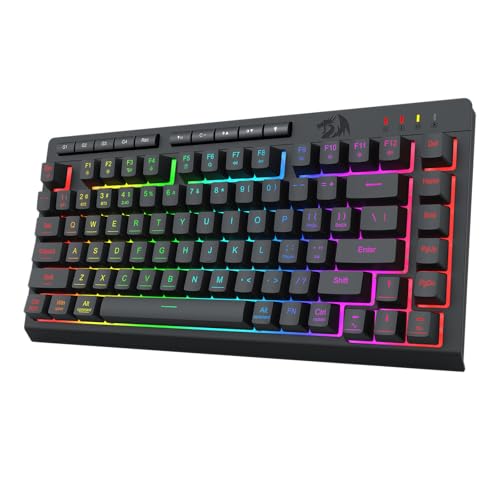
Redragon 75% Tri-Mode Wireless Keyboard
The Redragon 75% Tri-Mode Wireless Keyboard trades the full-size layout of the K526 PRO for a more compact 75% form factor. It measures 12.8 inches long and 6.14 inches wide, saving significant desk space while retaining tri-mode connectivity via USB-C, Bluetooth, and 2.4GHz wireless. You give up the dedicated number pad and the on-board LED display found on the original. This model includes a control knob for media and lighting adjustments. It weighs 1.13 pounds, making it lighter and more portable. If you prioritize a smaller footprint and battery efficiency over a full number pad, this compact alternative suits your needs better than the larger K526 PRO.
Redragon Wireless RGB Gaming Keyboard
The Redragon K503 Wireless RGB Keyboard offers a full-size layout similar to the K526 PRO but focuses on silence and battery longevity. It includes a built-in wrist rest for ergonomic comfort, which the K526 PRO lacks. You lose the LED status display and the single control knob found on the original. This model uses membrane switches optimized for quiet operation. It connects wirelessly but does not mention the same tri-mode flexibility. The dimensions are 17.5 inches long and 7.9 inches wide. If you need a wrist rest and prioritize silent typing over on-board status indicators, this budget-friendly full-size option is a practical choice over the feature-rich K526 PRO.
EPOMAKER x Aula F75 75% Wireless Keyboard
The EPOMAKER x Aula F75 shifts from membrane to mechanical switches, offering a tactile typing experience unlike the quiet membrane keys of the K526 PRO. It features a 75% layout, gasket mount construction, and hot-swappable switches for customization. You gain a premium build feel and the ability to change switches, but you lose the full-size layout and the on-board LED display. It includes a volume knob for media control. The keyboard measures 12.7 inches long and weighs 2.2 pounds. If you prefer mechanical feedback and hardware customization over membrane silence and status displays, this compact mechanical alternative provides a different typing experience suited for enthusiasts.
ASUS ROG Strix Scope II 96 Wireless
The ASUS ROG Strix Scope II 96 Wireless provides a 96% layout that balances full-size functionality with a compact footprint, unlike the full-size K526 PRO. It uses linear mechanical switches and hot-swappable sockets for customization, offering a different tactile feel than the membrane keys of the original. It features PBT keycaps and supports both Mac and Windows operating systems. You gain mechanical switch quality and cross-platform compatibility but lose the on-board LED display and the single control knob. The keyboard measures 14.8 inches long and weighs 2.78 pounds. If you want mechanical switch customization and a numpad in a slightly smaller frame, this versatile option is a strong alternative.
TECKNET Wired RGB Keyboard with Metal Base
The TECKNET Wired RGB Keyboard with Metal Base differs by using a wired connection instead of the wireless flexibility of the K526 PRO. It offers a stable connection without battery management but lacks Bluetooth or 2.4GHz wireless options. The keyboard features a metal base for durability and spill resistance, which the plastic K526 PRO does not emphasize. It measures 17 inches long and 7 inches wide, closely matching the original's footprint. You gain a stable wired link and ergonomic comfort but lose wireless freedom, the LED display, and the control knob. If you prioritize connection stability and a metal build over wireless convenience and status indicators, this wired alternative is a practical choice.
EPOMAKER Galaxy100 Wireless Aluminum Keyboard
The EPOMAKER Galaxy100 Wireless Aluminum Keyboard offers a full-size layout with a metal build, contrasting with the plastic construction of the K526 PRO. It features linear mechanical switches and hot-swappable sockets, providing a tactile experience different from the membrane keys of the original. It supports QMK/VIA customization for deep software control. You gain a premium metal chassis and switch customization but lose the on-board LED display and the single control knob. The keyboard measures 15.9 inches long and weighs significantly more due to its build. If you want a metal build, mechanical switch feel, and advanced software customization, this robust alternative is suitable for enthusiasts who do not need the status display of the K526 PRO.
Quick picks
Our 7 picks

Redragon Wireless RGB Membrane Gaming Keyboard
Best for: Multi-device users wanting quiet wireless membrane gaming
- Switch Type
- Membrane
- Connectivity
- USB-C, Bluetooth, 2.4GHz wireless
- Backlighting
- RGB
- Use
- Gaming
- Color
- Black
- Dimensions
- 17.5 × 5.4 × 1.38 inches
View on Amazon: Redragon Wireless RGB Membrane Gaming Keyboard
This full-size membrane keyboard offers tri-mode connectivity via USB-C, Bluetooth, and 2.4GHz wireless. An integrated LED screen displays your battery percentage, connection status, and charging state at a glance. You get a dedicated control knob for volume and lighting, 14 preset RGB modes, and 26 anti-ghosting keys, making it a solid fit for multi-device everyday play.
Pros
- Tri-mode connection with USB-C, Bluetooth, and 2.4GHz wireless
- Built-in LED display shows battery level and connection mode
- Dedicated control knob adjusts volume, mute, and lighting
- Software support for custom macros and lighting adjustments
Cons
- Anti-ghosting is limited to 26 keys rather than full rollover
- Full 17.5-inch width occupies substantial desk space
Good fit if
- You switch between Bluetooth, 2.4GHz wireless, and USB-C across multiple systems.
- You want an integrated display screen to monitor battery status directly.
- You prefer quiet membrane keys with dedicated hardware knob controls.
Skip if
- You require mechanical key switches instead of membrane domes.
- You need full N-key rollover beyond 26 simultaneous inputs.
Verdict: Redragon Wireless RGB Membrane Keyboard fits multitaskers who want wireless flexibility, silent membrane typing, and an informative on-board status display.
Redragon 75% Tri-Mode Wireless Keyboard
Best for: Compact wireless gaming and office use
- Switch Type
- Membrane
- Form Factor
- 75%
- Connectivity
- Bluetooth 5.0, 2.4G, USB-C wired
- Backlighting
- RGB
- Use
- Gaming
- Color
- Black
This Redragon keyboard offers a compact 75% layout with tri-mode connectivity via Bluetooth 5.0, 2.4GHz, or USB-C. It features a 4000mAh battery that lasts up to 300 hours without RGB lighting. The keys provide a mechanical feel and support 26-key anti-ghosting. You get full RGB customization with 16.8 million colors and 12 multimedia keys. It is a practical choice for gamers and office users who need portability and long battery life.
Pros
- Tri-mode connectivity including Bluetooth 5.0 and 2.4GHz
- 4000mAh battery provides up to 300 hours of use
- 16.8 million color RGB lighting with 8 dynamic effects
- 26-key anti-ghosting for accurate gaming input
Cons
- Membrane switches lack the tactile feedback of mechanical switches
- 75% layout omits the numpad for number-heavy tasks
- Driver software is not included with the keyboard
Good fit if
- You need a compact keyboard that saves desk space
- You want wireless flexibility with multiple connection options
- You prefer long battery life for travel or office use
Skip if
- You require a full-size keyboard with a numpad
- You want genuine mechanical switches for typing
- You need dedicated software installed on the device
Verdict: Redragon 75% Wireless RGB Keyboard fits users who prioritize portability and battery life over tactile switch feel. It is ideal for those who want a compact layout with versatile wireless connectivity.

Redragon Wireless RGB Gaming Keyboard
Best for: Users wanting long battery life and silence
- Switch Type
- Silent Membrane
- Connectivity
- 2.4GHz wireless, Bluetooth, USB wired
- Backlighting
- RGB LED
- Use
- Gaming
- Operating System
- Windows
- Ergonomic Features
- Wrist Rest
The Redragon K503 is a full-size wireless membrane keyboard with tri-mode connectivity. It uses a 4000 mAh battery and silent switches. You get RGB lighting, 25 anti-ghosting keys, and software programmability. It includes a wrist rest and multimedia keys. This model suits users who want long battery life and quiet typing without a mechanical feel.
Pros
- 4000 mAh battery for extended use
- Silent membrane switches for quiet operation
- Tri-mode connection (Bluetooth, 2.4G, USB)
- Includes a dedicated wrist rest
Cons
- Membrane switches lack tactile feedback
- No hot-swappable switches
- Larger footprint than compact layouts
Good fit if
- You need a quiet keyboard for shared spaces
- You want a large battery with no frequent charging
- You prefer a full-size layout with a wrist rest
Skip if
- You require tactile or clicky mechanical switches
- You want a compact 60% or 75% keyboard
- You need hot-swappable switches for customization
Verdict: Redragon K503 Wireless RGB Membrane Keyboard is a solid choice for users prioritizing battery life and silence over tactile response. It fits those who want a full-size layout with a wrist rest.

EPOMAKER x Aula F75 75% Wireless Keyboard
Best for: compact mechanical setups with wireless needs
- Switch Type
- LEOBOG Reaper
- Form Factor
- 75%
- Connectivity
- Bluetooth, 2.4GHz wireless, wired USB
- Backlighting
- RGB
- Keycap Material
- Double-shot PBT
- Hot-Swap Support
- Hot-Swappable
The EPOMAKER x Aula F75 is a 75% mechanical keyboard featuring LEOBOG Reaper switches and a gasket mount. It offers three connectivity modes: Bluetooth, 2.4GHz wireless, and wired USB. A 4000mAh battery supports long use, while a multimedia knob adds convenience. Double-shot PBT keycaps and hot-swappable sockets allow for customization. This compact layout fits smaller desks while retaining arrow keys and function row.
Pros
- 75% compact layout with essential keys
- Three connectivity modes: BT, 2.4GHz, wired
- 4000mAh battery for extended usage
- Full-key hot-swappable sockets
- Multimedia control knob
Cons
- Heavier build at 2.2 pounds
- Larger footprint than 60% options
- No dedicated software mentioned for lighting
Good fit if
- You want a compact layout with arrow keys
- You prefer mechanical switches over membrane
- You need wireless flexibility for multiple devices
Skip if
- You require a full-size numpad
- You prefer lightweight keyboards under 1.5 pounds
- You only want wired connections
Verdict: EPOMAKER x Aula F75 75% Mechanical Keyboard suits users who value a compact mechanical typing experience with wireless freedom and customization options. It is ideal for those who want a gasket-mounted feel without sacrificing the function row.

ASUS ROG Strix Scope II 96 Wireless
Best for: Users needing a numpad in a compact layout
- Switch Type
- ROG NX Snow linear
- Form Factor
- 96%
- Connectivity
- Bluetooth, 2.4GHz wireless, USB wired
- Backlighting
- RGB
- Keycap Material
- PBT
- Hot-Swap Support
- Hot-Swappable
This 96 percent mechanical keyboard keeps the numpad in a compact footprint. It uses tri-mode connectivity including 2.4GHz wireless and Bluetooth. The ROG NX Snow linear switches are hot-swappable and pre-lubed. PBT keycaps and sound-dampening foam improve durability and acoustics. It suits you if you need full-size functionality without the bulk.
Pros
- 96 percent form factor with numpad
- Tri-mode connectivity with 2.4GHz wireless
- Hot-swappable ROG NX Snow linear switches
- PBT keycap material
- Integrated sound-dampening foam
Cons
- Heavier build at 2.78 pounds
- Larger footprint than 75 percent options
- No dedicated app mentioned for macro programming
Good fit if
- You need a numpad but want a compact desk layout
- You prefer linear switches with smooth keystrokes
- You want hot-swappable switches for customization
Skip if
- You strictly want a 75 percent layout without a numpad
- You prefer a lighter, more portable keyboard
- You need optical switches for faster response
Verdict: ASUS ROG Strix Scope II 96 Wireless is a solid pick for users who want full-size layout efficiency with mechanical switch customization. It fits those prioritizing acoustic quality and connectivity options over minimal footprint.

TECKNET Wired RGB Keyboard with Metal Base
Best for: Quiet typing with wired stability
- Switch Type
- Volcano switch
- Connectivity
- Wired
- Backlighting
- 15-Zone RGB
- Keycap Material
- ABS plastic
- Case Material
- Metal
- Use
- Gaming
The TECKNET TK-KB002 is a wired gaming keyboard with a metal base and 15-zone RGB backlighting. It uses volcano switches for quiet operation and includes 25 anti-ghost keys. The design features an ergonomic 7-degree angle and a wrist rest to reduce fatigue. It offers IP32 spill resistance and 12 multimedia keys. This keyboard suits users who prefer a stable, quiet typing experience with customizable lighting.
Pros
- 15-zone RGB backlighting with 7 modes
- Metal base for durability
- Whisper-quiet volcano switches
- IP32 spill resistance with drainage holes
- Ergonomic 7-degree angle and wrist rest
Cons
- Wired connectivity only
- Multimedia keys not compatible with Mac
- ABS plastic keycaps
Good fit if
- You want a quiet keyboard for shared spaces
- You prefer a wired connection for stability
- You like ergonomic designs with wrist support
Skip if
- You need wireless freedom
- You use a Mac computer
- You want hot-swappable switches
Verdict: TECKNET TK-KB002 Wired RGB Gaming Keyboard is a solid choice for users who value a stable wired connection and quiet operation. It fits those who prioritize ergonomic comfort and spill resistance over wireless convenience.

EPOMAKER Galaxy100 Wireless Aluminum Keyboard
Best for: Users wanting a metal build and QMK/VIA control
- Switch Type
- Linear
- Form Factor
- 1800
- Connectivity
- 2.4Ghz wireless, BT, USB-C
- Backlighting
- RGB
- Keycap Material
- PBT
- Case Material
- Aluminum alloy
View on Amazon: EPOMAKER Galaxy100 Wireless Aluminum Keyboard
The EPOMAKER Galaxy100 is an 1800 layout keyboard with a solid aluminum alloy shell. It uses pre-lubed linear switches and a gasket mount for a dampened typing feel. You get QMK/VIA support for deep customization and a large 8000mAh battery for long wireless use. South-facing RGB LEDs provide bright per-key illumination. This model suits users who want a heavy, durable build with extensive software control.
Pros
- Aluminum alloy shell for a heavy, stable build
- 8000mAh battery for extended wireless performance
- QMK/VIA support for full key remapping and macros
- Hot-swappable PCB with pre-lubed linear switches
Cons
- Larger 1800 layout takes up more desk space
- No dedicated media keys beyond the single knob
- South-facing LEDs may not shine on all keycap profiles
Good fit if
- You want a heavy keyboard with a metal case
- You need QMK/VIA for advanced customization
- You prefer linear switches for smooth keystrokes
Skip if
- You need a compact 60% or 75% layout
- You require dedicated multimedia keys
- You prefer tactile or clicky switch types
Verdict: The EPOMAKER Galaxy100 QMK 1800 Wireless is a robust option for users who prioritize a metal build and deep software customization. Its large battery and hot-swap capability make it a practical choice for enthusiasts.
Specifications side by side
| Spec | Redragon Wireless RGB Membrane Gaming Keyboard | Redragon 75% Tri-Mode Wireless Keyboard | Redragon Wireless RGB Gaming Keyboard | EPOMAKER x Aula F75 75% Wireless Keyboard | ASUS ROG Strix Scope II 96 Wireless | TECKNET Wired RGB Keyboard with Metal Base | EPOMAKER Galaxy100 Wireless Aluminum Keyboard |
|---|---|---|---|---|---|---|---|
| Switch Type | Membrane | Membrane | Silent Membrane | LEOBOG Reaper | ROG NX Snow linear | Volcano switch | Linear |
| Form Factor | not specified | 75% | not specified | 75% | 96% | not specified | 1800 |
| Connectivity | USB-C, Bluetooth, 2.4GHz wireless | Bluetooth 5.0, 2.4G, USB-C wired | 2.4GHz wireless, Bluetooth, USB wired | Bluetooth, 2.4GHz wireless, wired USB | Bluetooth, 2.4GHz wireless, USB wired | Wired | 2.4Ghz wireless, BT, USB-C |
| Backlighting | RGB | RGB | RGB LED | RGB | RGB | 15-Zone RGB | RGB |
| Keycap Material | not specified | not specified | not specified | Double-shot PBT | PBT | ABS plastic | PBT |
| Case Material | not specified | not specified | not specified | not specified | not specified | Metal | Aluminum alloy |
| Hot-Swap Support | not specified | not specified | not specified | Hot-Swappable | Hot-Swappable | not specified | Hot-Swappable |
| Mounting Style | not specified | not specified | not specified | Gasket Mount | not specified | not specified | not specified |
| Media Controls | not specified | not specified | not specified | Volume Knob | not specified | not specified | not specified |
| Use | Gaming | Gaming | Gaming | Gaming | Gaming | Gaming | Gaming |
| Design | not specified | not specified | not specified | not specified | not specified | Ergonomic | not specified |
| Color | Black | Black | Blue-Black | Black | Black | Black | Black |
| Operating System | not specified | Mac, Windows | Windows | not specified | Mac | not specified | not specified |
| Ergonomic Features | not specified | not specified | Wrist Rest | not specified | not specified | not specified | not specified |
| Noise Level | not specified | Silent | Silent | not specified | not specified | Silent | not specified |
| Power Source | not specified | Rechargeable | not specified | not specified | not specified | not specified | not specified |
| Dimensions | 17.5 × 5.4 × 1.38 inches | 12.8 × 6.14 × 1.5 inches | 17.5 × 7.9 × 1.18 inches | 12.7 × 5.64 × 1.7 inches | 14.8 × 5.16 × 1.57 inches | 17 × 7 × 1.4 inches | 5.43 × 15.9 × 1.26 inches |
| Weight | not specified | 1.13 pounds | not specified | 2.2 pounds | 2.78 pounds | not specified | not specified |
| Model | K526 PRO | K524-RGB | K503KS | 6b745e03-bc8d-4bfe-8d91-b2ef1a0980e8 | X901 STRIX SCOPE II 96 WL/NXSW/CA/PBT | TK-KB002 | Galaxy100 |
| Size | not specified | not specified | K503KS | LEOBOG Reaper Switch | Snow Linear | not specified | Marble White Switch |
Frequently asked questions
Which Redragon keyboard offers the best battery life for silent typing?
The Redragon K503 Wireless RGB Membrane Keyboard is the best budget pick for users prioritizing silence and long battery life. It features a full-size layout that includes a wrist rest for added comfort during extended sessions. This model uses silent membrane switches, making it ideal for quiet environments where tactile feedback is less important than noise reduction.
What is the most compact Redragon wireless option available?
The Redragon 75% Tri-Mode Wireless Keyboard is the most compact option in this lineup. It measures 12.8 inches in length and 6.14 inches in width, offering a significant footprint reduction compared to full-size models. This 75% form factor retains essential function keys while saving desk space, making it suitable for both gaming and office use where portability is key.
Are there hot-swappable alternatives to the Redragon K526 PRO?
Yes, the EPOMAKER x Aula F75 and the EPOMAKER Galaxy100 both feature hot-swappable switches. This allows you to change switches without soldering, providing greater customization than the standard membrane setup of the K526 PRO. The EPOMAKER Galaxy100 also supports QMK/VIA software for deep layout customization, catering to enthusiasts who want to tailor their typing experience.
Does the Redragon K526 PRO have a wrist rest included?
The provided data does not list a wrist rest as an included accessory for the Redragon K526 PRO Wireless RGB Membrane Keyboard. However, the Redragon K503KS model explicitly includes a wrist rest. If you require ergonomic support from the manufacturer, the K503KS is a suitable alternative that provides this feature alongside its wireless connectivity and silent membrane switches.
Which keyboard has a metal base for stability?
The TECKNET Wired RGB Keyboard with Metal Base is the only option listed with a metal construction. It measures 17 inches in length and 7 inches in width, providing a stable wired connection for gaming. This model is designed for users who prioritize a solid build and spill resistance over wireless convenience, offering a robust foundation for your setup.
Can I use these keyboards with Mac computers?
The ASUS ROG Strix Scope II 96 Wireless is explicitly listed as compatible with Mac operating systems. It features a 96% full-size layout with a numpad and linear switches. While other keyboards in this list are primarily marketed for gaming and Windows, the ASUS model ensures cross-platform functionality for users who need a versatile wireless keyboard for Mac devices.
Which alternative includes a volume knob for media control?
The EPOMAKER x Aula F75 75% Wireless Keyboard includes a dedicated volume knob for media control. This feature allows you to adjust audio levels quickly without using software shortcuts. It combines this hardware control with a gasket-mounted design for a flexible typing feel, making it a premium choice for users who value tactile media management alongside their wireless connectivity.
What is the difference between membrane and mechanical options here?
The Redragon models listed, such as the K526 PRO and K503, use membrane switches for a quieter, softer typing experience. In contrast, options like the EPOMAKER x Aula F75 and ASUS ROG Strix Scope II 96 use mechanical switches. Mechanical keyboards typically offer more tactile feedback and durability, while the membrane options prioritize silence and lower cost for general gaming or office tasks.